

Performance Max Transparency in 2026: What the Black Box Still Hides

Performance Max is more transparent in 2026, but some of the questions that matter most to advertisers remain unanswered. You still cannot clearly see how PMax allocates your budget across channels, whether conversions represent genuinely incremental demand, or how much spend is being absorbed by existing customers, repeat users and invalid traffic. Google gives you more visibility into what PMax delivered. It still cannot tell you whether every click and conversion was worth paying for.
Performance Max sits at the centre of many Google Ads accounts now, and it does not resemble the campaign type advertisers first met. Channel-level reporting, search terms reporting, campaign-level negative keywords, asset-level conversion data and lifecycle goals have all arrived. If your view of PMax was formed at launch, it is out of date. Advertisers can see and control far more than they could before.
But more transparency does not mean the black box has disappeared. Google can show you more about where PMax delivered results, but that is different from independently verifying the traffic behind them. That distinction matters for click fraud protection, because greater reporting visibility does not tell you whether every engagement was genuine, incremental or worth paying for.
The question worth asking in 2026 is no longer whether Performance Max is a black box. It is what PMax still does not show you, and whether those blind spots affect the decisions you make with your budget.
Most optimisation advice focuses on the settings you can control: assets, exclusions, targeting and goals. But some of the decisions with the biggest impact on your spend still sit with Google, including how PMax allocates budget across channels and which conversions its algorithm learns from and optimises towards.
What Performance Max Now Shows You
Performance Max is considerably more transparent than it was three years ago. These are the changes that matter most to day-to-day campaign decisions.
Channel performance reporting reached all PMax campaigns on 6 November 2025, giving advertisers channel-level impressions, clicks, conversions and cost across Search, Display, YouTube, Discover, Maps, Gmail and Search partners. Google added Search Partner Network segmentation in January 2026 and removed parked domains from the network the following month.
Search terms reporting shows which queries triggered your ads alongside ad format, landing page and conversion data, with Google retaining data from March 2023 onwards.
Campaign-level negative keywords give advertisers direct query controls, although Google states they apply to Search and Shopping inventory only.
Asset group and asset-level reporting provides conversion, conversion value, conversion rate and cost-per-conversion data, giving advertisers more to work with than the old Low, Good and Best ratings.
Brand exclusions now offer greater control over branded traffic, including the ability to exclude brands from Search while continuing to serve Shopping ads for queries containing those brands.
Lifecycle goals let advertisers optimise towards new customers, lapsed customers or higher-value segments rather than treating every conversion equally.
The Invalid Activity Credit Report, added in April 2026 for Search and PMax, shows the invalid activity Google identified and credited back at campaign level.
The direction of travel matters as much as the individual features. Google confirmed on 15 April 2026 that Dynamic Search Ads will begin automatically upgrading to AI Max from September 2026, ahead of DSA being retired in February 2027. Reporting is opening up at the same time as Google's automation is taking on more targeting decisions.
And that leaves an important distinction. More reporting tells you more about what PMax did. It does not independently verify whether the traffic behind those results was genuine, incremental or worth paying for. That is the gap TrafficGuard for Performance Max is built to address.
Where Performance Max Transparency Stops
Channel-level visibility has not translated into channel-level control. Diagnosis is now possible. Direction is not.
Seeing that YouTube took 30% of a budget and returned very little is useful. What you cannot do is give PMax the next instruction: spend 60% on Shopping, 25% on Search and no more than 15% on YouTube. Google makes that allocation and can remake it as campaign conditions change.
The same limitation runs through the surrounding controls. Placement reporting exists, but Google states plainly that placement reports "shouldn't be used to evaluate performance" and should instead be used as a brand safety tool.,You can see where an ad appeared, but not reliably judge what that placement contributed.
Negative keywords give you greater control over Search and Shopping, but they do not extend to video and display inventory. Search themes have also expanded from 25 to 50 per asset group, but they remain signals rather than targeting constraints. Adding a theme can guide PMax towards relevant searches; it cannot tell the system exactly where your budget should go.
Reporting has improved considerably. What remains inside the black box is the allocation logic: why PMax chose one channel, placement or audience opportunity over another, and how much budget it will send there next.
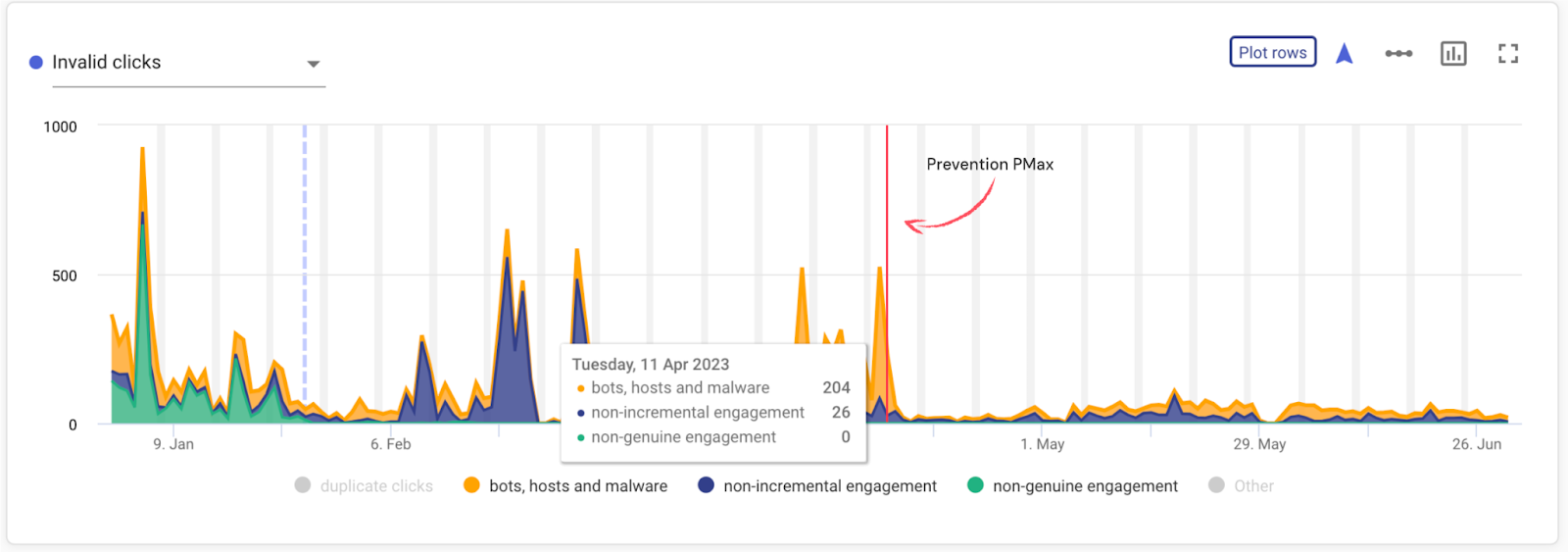
Note: Bot traffic, non-incremental engagement, and non-genuine engagement within this Performance Max campaign fall dramatically after TrafficGuard’s invalid traffic prevention mode is switched on.
A Good ROAS Does Not Prove You Grew
A ROAS target confirms efficiency. It does not establish incrementality. PMax is designed to find conversions against the goals you give it, but some of the easiest conversions to capture can come from demand that already exists.
That can include branded searches, existing customers, remarketing audiences, bestselling products and users already close to purchase. A campaign can therefore meet its ROAS target while claiming conversions that might have happened through another campaign, channel or direct visit anyway.
Brand exclusions are one way to test how much PMax depends on that existing demand. Exclude branded searches and compare PMax volume, cost and conversion performance before and after. A significant drop does not prove every lost conversion was non-incremental, but it does show how heavily the campaign was relying on people already searching for your brand.
We have seen this pattern in our own client work. After branded traffic was separated from PMax, brand Search performance returned towards the levels seen before PMax was introduced, indicating that some conversions had shifted between campaigns rather than representing entirely new demand.
Set that alongside the channel report and the remaining blind spot becomes clear. Google can now show you where PMax spent the money and where conversions were recorded. It cannot tell you whether those conversions would have happened without PMax.
Why Invalid Traffic Costs More Inside an Automated Campaign
A credit can return wasted media cost. It cannot undo every optimisation decision made while that traffic was in the campaign data. That distinction matters more in PMax because automated bidding and targeting continuously learn from the conversion signals an advertiser provides.
PMax optimises towards the conversion actions you tell it matter. If those actions include bot-generated leads, duplicate submissions, existing-customer activity or leads the sales team later rejects, the campaign can receive signals that look valuable inside Google Ads but contribute little or nothing to the business.
- The risk compounds:
- You pay for the visit
- An unwanted action is recorded as a conversion
- That conversion becomes part of the data PMax optimises against
- Future budget can be directed towards traffic that produces similar signals
Our 2026 Invalid Traffic Statistics estimate that invalid traffic consumes 22% of global digital ad spend, equivalent to more than one pound in every five. In an automated campaign, the concern extends beyond the immediate wasted spend. Poor-quality signals can also influence what the campaign optimises towards next.
The Invalid Activity Credit Report is worth reviewing, although the mechanics of the credit matter. Google credits invalid activity identified after an invoice has been finalised and states that the original click remains attributed to the month in which it occurred while the corresponding credit appears in a subsequent month. The cost can be credited later, but the campaign decisions made in the meantime are not retrospectively rerun.
There is another blind spot that Google's invalid activity reporting is not designed to solve. Google defines invalid traffic around activity that does not result from genuine user interest, including fraudulent, accidental and duplicate clicks. But not every click that wastes advertising budget is invalid.
A genuine existing customer clicking a paid brand ad to reach a business they already intended to visit may still be a valid click. So can a genuine user who repeatedly clicks without creating incremental value. There may be nothing fraudulent about either interaction, which means there is no reason to expect an invalid activity credit.
A clean-looking invalid activity report is therefore not the same as clean optimisation data.
How We Helped Winni Cut Non-Incremental Traffic
Google's reporting can tell you what happened inside a campaign. Independent verification can tell you more about who was behind those interactions.
Winni, an eCommerce gifting platform, was running Google paid search at scale when TrafficGuard identified activity that standard campaign reporting was not separating from genuine demand.
In one month, prevention reduced bot traffic by 62.5% and non-incremental engagement by 70%. During the analysis, we found a single device clicking Winni's paid ads 139 times in one hour.
That is the reporting gap that matters. Those clicks can appear alongside genuine customer activity in campaign metrics, despite representing very different value to the advertiser. Without independent verification, marketers are left making optimisation decisions from the aggregate numbers.
The discrepancy is not unique to Winni. In a separate online marketplace case study, TrafficGuard analysed an advertiser spending $40,000 a month on Google Ads and identified 135% more invalid traffic than Google identified across the same campaigns.
A clean Google Ads report therefore does not necessarily mean every paid interaction was valuable. Different detection methods identify different patterns, which is why independent verification matters alongside Google's own invalid activity controls.
How TrafficGuard Addresses the Remaining Gap
Every reporting and control feature Google has added since 2023 gives advertisers more information about what PMax did. It still leaves a separate question unanswered: was the traffic behind those results worth paying for?
TrafficGuard for Performance Max adds an independent layer of traffic verification to PMax. Instead of relying only on the campaign-level outcome, it analyses the engagements behind that performance to identify invalid, repeat and non-incremental activity that can inflate spend and distort optimisation signals.
That gives advertisers another layer of evidence alongside Google's channel reporting. You can see where PMax spent, then assess how much of that activity represented genuine demand rather than bots, repeated engagement or customers you were already likely to reach.
TrafficGuard for Google Search applies the same approach to standard Search campaigns, giving advertisers a consistent view of traffic quality across their Google Ads activity.
The distinction is simple. Google tells you how PMax performed against the goals it was given. TrafficGuard helps you verify the traffic that produced that performance.
Six Checks Worth Running Now
Start with the checks most likely to change where your budget goes.
Open the channel performance report. Identify which surfaces are absorbing spend and compare their contribution to conversions and conversion value. Visibility does not give you channel-level budget controls, but it does show you where to investigate.
Open the search terms report and build a negative keyword list. Support queries, irrelevant job searches, unwanted competitor terms and existing-customer navigation can all consume budget without creating new demand. Negative keywords now give you a direct way to remove many of them from Search and Shopping inventory.
Apply brand exclusions and measure the delta. Record what happens to spend, conversions and ROAS when branded demand is removed from PMax. A material change shows how dependent the campaign was on people already searching for your brand, giving you a better basis for questioning incrementality.
Check for campaign overlap. If PMax and Standard Shopping use the same product feed and pursue the same conversion goals, establish what job each campaign is supposed to perform. Use Search where query and messaging control matter, Standard Shopping where you need greater product-level control, and PMax where broader conversion-led reach serves a clear purpose.
Audit the conversion set before the campaign settings. Establish what every conversion action actually represents and whether the sales or revenue team would recognise it as valuable. PMax can only optimise towards the signals you give it.
Verify traffic quality independently. Every check above helps you understand or steer the algorithm. None independently establishes whether the engagements behind the numbers represent genuine, incremental demand.
For a broader view of where the campaign type works and where its limitations remain, see our guide to Performance Max pros and cons. For the practical campaign controls, our Performance Max optimisation guide covers bidding, brand exclusions and audience signals in more detail.
Performance Max Transparency in 2026: What Still Matters
Performance Max is significantly more transparent than it was at launch. Advertisers can now inspect channel performance, search terms, asset performance and a broader set of exclusions and campaign controls.
The remaining gap is not simply visibility. It is knowing what the reported performance actually represents.
Google still determines how PMax distributes budget across channels, and campaign reporting alone cannot establish whether every conversion represents new demand. A genuine existing customer, repeated visitor or non-incremental click can still appear alongside valuable new customer activity without being invalid under Google's definitions.
That is why Performance Max optimisation increasingly requires two views: where Google spent the budget and what quality of traffic produced the result.
TrafficGuard for Performance Max adds that independent traffic verification layer, helping advertisers identify invalid, repeat and non-incremental activity behind reported PMax performance. Book a demo to see how it applies to your own campaign data.
Frequently Asked Questions
What has changed in Performance Max in 2026?
Performance Max gives advertisers considerably more visibility and control than it did at launch. Google now provides channel performance reporting, detailed search terms reporting, campaign-level negative keywords, asset-level conversion metrics, brand exclusions and lifecycle goals. In 2026, Search Partner Network traffic was also separated within channel reporting, parked domains were removed from the network and Google introduced the Invalid Activity Credit Report for Search and Performance Max campaigns.
Is Performance Max still a black box?
Performance Max is more transparent than it used to be, but important parts of the system remain automated. Advertisers can see which channels served ads, which search terms triggered them and how assets contributed to conversions. What they still cannot directly control is exactly how budget is allocated between channels, or determine from Google Ads reporting alone whether every conversion was genuinely incremental.
Can I see which channels Performance Max spends my budget on?
Yes. The Performance Max channel performance report shows performance across Google Search, Display, YouTube, Discover, Gmail, Maps and Search partners, including metrics such as impressions, clicks, cost and conversions. However, advertisers cannot set a fixed percentage of PMax budget for each channel. Google continues to determine that allocation automatically.
Can I add negative keywords to Performance Max?
Yes. Google allows negative keywords at both campaign and account level for Performance Max. They apply to Search and Shopping inventory, not Display or Video inventory. The Performance Max search terms report can help identify irrelevant queries that may warrant exclusion.
Can Performance Max cannibalise Search campaigns?
Performance Max can overlap with demand that might otherwise be captured through Search, particularly branded searches and users already familiar with your business. Brand exclusions can help test how dependent a PMax campaign is on branded demand. Compare spend, conversions and overall account performance before and after applying exclusions, rather than assuming every conversion that disappears was cannibalised.
Does a high ROAS mean Performance Max is working?
A strong ROAS shows that Performance Max is achieving revenue against the spend attributed to it, but it does not prove that every conversion was incremental. Brand searches, remarketing audiences and existing customers can all contribute to reported performance. To judge whether PMax is creating additional value, compare its results with account-level revenue, new-customer data and CRM outcomes.
How does Performance Max handle invalid traffic?
Google uses automated systems to filter invalid traffic and prevent advertisers from being charged for activity it identifies as invalid. Some activity may be detected after billing, in which case Google can issue credits. The Invalid Activity Credit Report for Search and PMax shows credited clicks, interactions and spend at campaign level. It does not, however, measure whether genuine clicks from existing customers, repeat users or other non-incremental traffic were worth paying for.
How do I know if Performance Max is finding new customers?
Use Google's lifecycle and new-customer acquisition goals as one signal, but validate the results against your own customer data. Compare PMax conversions with CRM customer status, new-customer revenue and total account-level conversions. Brand exclusions can also help reveal how much campaign performance depends on users who were already searching for your business.
Get started - it's free
You can set up a TrafficGuard account in minutes, so we’ll be protecting your campaigns before you can say ‘sky-high ROI’.

Explore More Blogs


Subscribe
Subscribe now to get all the latest news and insights on digital advertising, machine learning and ad fraud.


