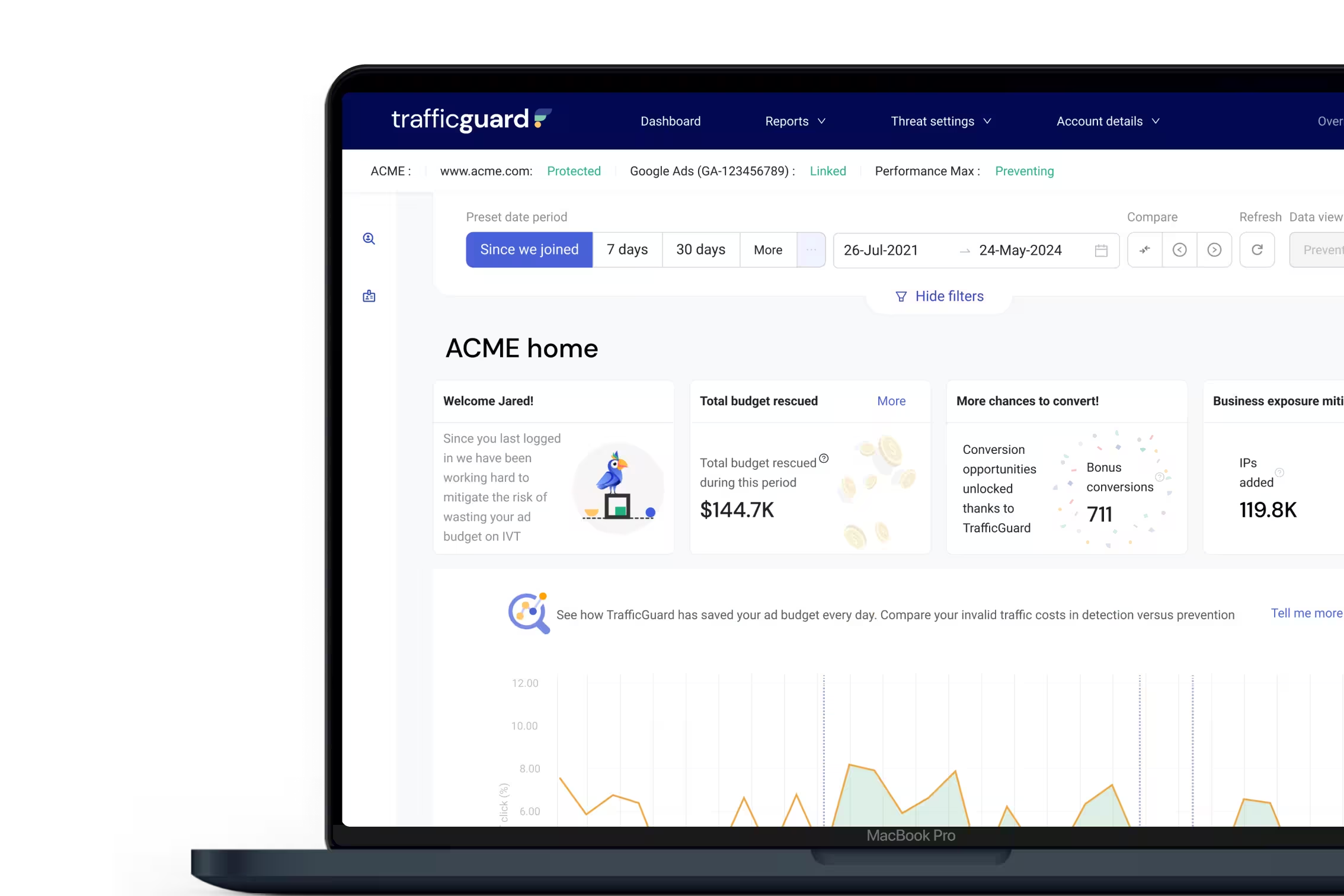
TrafficGuard for Google Ads
Google Ads Click Fraud Protection That Reduces Wasted Spend
Every click you pay for should have the potential to become a customer. TrafficGuard detects fake clicks on Google Ads, bots, and other invalid traffic across Search, YouTube, Demand Gen, Shopping, Display, and Performance Max, protecting your ad spend and giving Smart Bidding cleaner signals to optimise against.




Join 10,000+ advertisers protecting more than $2bn in ad spend with TrafficGuard.






The Problems
Not Every Click You Pay For Brings You a New Customer
Bot traffic in Google Ads is only part of the problem. You can also spend Google Ads budgets on repeated or low-value clicks that don’t generate new business. The result? More spend, misleading performance signals, and less budget for acquiring genuine customers.

Bots and automation.
Can't lead to a conversion
Scrapers, competitor scripts, and malicious bots can imitate human behaviour, trigger paid clicks, and inflate traffic without bringing genuine buying intent. Google filters a lot of general invalid traffic, but sophisticated bots are built to get past it, rotating through real residential IPs and behaving like people.

Non-genuine engagement.
Won't lead to a conversion
Repeated clicks and suspicious engagement can consume budget without delivering value. When the activity is invalid, it can also distort the signals used to assess campaign performance.

Non-incremental clicks.
Doesn't add a new conversion
Existing customers may click your branded ads to log in, reorder, or return to your site. Engaged shoppers may click again and again while they browse. These clicks can have value, but they don't necessarily represent a new customer or incremental revenue. Every click is billed, so your CAC climbs. The question is how much you want to keep paying to chase the same user.
Invalid Traffic Can Waste Budget and Distort Google Ads Performance
Wasted clicks don't just affect your advertising costs. Invalid activity can make it harder to understand which campaigns are attracting genuine customers. When invalid conversions or misleading conversion values enter your data, they can also affect Smart Bidding and Performance Max.
*Sources: Thales/Imperva Bad Bot Report 2026; Search Engine Land.


The solution | Google Ads
Google Ads Click Fraud Prevention. Cleaner Signals. More From Your Budget.
TrafficGuard protects your budget from invalid traffic, improves the quality of your campaign data, and recovers eligible invalid-click costs. It covers Search, YouTube, Demand Gen, Shopping, Display, and Performance Max campaigns from one Google Ads connection and one dashboard.
Real-Time Protection
Stop wasting budget on invalid clicks
Detect bots, suspicious clicks and other invalid traffic using 200+ signals per click, including device fingerprint, timing and behaviour, not just IP address. In Prevention mode, TrafficGuard automatically adds identified invalid sources to your Google Ads IP exclusions, helping stop future invalid clicks before they cost you money. TrafficGuard also goes beyond Google's standard IP exclusion limit, so protection keeps scaling as invalid sources grow.
Better Campaign Data
Make better Google Ads decisions
Reduce the impact of invalid clicks on your reporting and the signals Smart Bidding and Performance Max optimise against. And see the users behind your CTR: how often each one clicks, what they cost, and the click at which your conversions actually happen. With less invalid activity affecting your campaign data, you can make better-informed decisions about where to invest your budget.
More Efficient Acquisition
Stop overpaying to chase the same user
Decide how many paid clicks one user is worth, by campaign or keyword, based on your margins and where your conversions fall. You stay in the auction on your brand terms when competitors bid on them, without paying full CPC every time the same person clicks. Users over the cap can be routed to a low-bid shadow campaign, so you lose the cost, not the customer.
Invalid-Click Claims
Identify potential Google Ads refunds
Get greater visibility into invalid-click activity and identify potential opportunities to claim eligible costs back from advertising platforms. TrafficGuard's reporting helps provide evidence to support your review and claims. Enterprise customers can add fully managed refund recovery, run on a performance-only basis.
From Click Detection to Campaign Protection in Four Steps

Connect Google Ads
Connect your Google Ads account so TrafficGuard can begin analysing your advertising traffic. Setup takes around 10 minutes and doesn't change your bidding.

Detect Google Ads click fraud
TrafficGuard examines click activity and visitor behaviour to identify suspicious patterns, bots, and excessive repeat clicks.

Identify wasted spend
See which clicks are flagged as invalid, with the reason for each, where they come from, and how they affect your campaigns.

Prevent future invalid clicks
With Prevention mode enabled, TrafficGuard automatically updates supported Google Ads exclusions to help reduce further invalid activity.
Beyond Google's Reporting
See the Invalid Clicks Behind
Your Google Ad Spend
Google Ads may credit eligible invalid clicks, but a refund doesn't give you the full picture. TrafficGuard gives you click-level visibility into detected threats, why traffic was flagged, and where your budget is being wasted.

Real Results Across Industries | Google Search
What Advertisers Get From Google Ads Click Fraud Prevention
See how businesses across industries use TrafficGuard to reduce invalid clicks, protect their Google Ads budgets, and improve campaign performance.


of their traffic was invalid
improvement in ROI
decrease in invalid traffic

Combating Bots in Major UK Betting Company

improvement in conversion rates
savings on returning users cost
growth in unlocked budget a quarter
Insuring Against Invalid Traffic with TrafficGuard

reduction in invalid clicks
of budget reinvested
ROI
First MENA Telco to Implement TrafficGuard Product: Search

increase in conversions
of ad budget lost to invalid clicks
of invalid traffic was due to multiple clicks
Fighting Ad Fraud in Education

See What Invalid Traffic Is Costing Your Account
Start a free 30-day Detection trial and watch every invalid click as it happens, or book a demo for a 14-day analysis of your Google Ads account. If we don't find anything worth fixing, you keep the report.
Recommended Resources
Stay up to date with TrafficGuard's latest resources on click fraud protection for marketers.



Trusted by Leading eCommerce Brands












Frequently Asked Questions About Google Ads Click Fraud Protection
Can’t find what you are looking for? Go to our support page to learn more.
Click fraud is when a person, bot, or script clicks a Google ad with no genuine buying intent, often creating unnecessary spend or inflating a publisher’s earnings. It is one type of invalid traffic, alongside accidental and duplicate clicks. Common sources are bots, click farms, and competitors, and each works differently, so it helps to know the main types of click fraud. Left unfiltered, these clicks waste spend and distort the data your campaigns optimise on.
Start with the Invalid clicks column in Google Ads, which shows the clicks Google has already filtered. Then look for what it misses: traffic spikes with no change in conversions, repeat clicks from the same source, falling conversion rates, and rising CPCs on brand terms. These are warning signs, not proof. TrafficGuard analyses every click against 200+ signals and shows you which users are invalid at click level, which Google’s reporting does not. For a fuller walkthrough, see our guide to detecting Google Ads click fraud.
Three steps. Review Google’s invalid-click reporting, investigate the suspicious traffic behind it, and exclude the sources you confirm are invalid. Manual IP exclusions in Google Ads work but lag behind the fraud and hit Google’s IP exclusion limit quickly. TrafficGuard automates all three: it analyses clicks in real time and, in Prevention mode, updates your Google Ads IP exclusions automatically so identified sources can’t click again.
Yes, partly. Google filters invalid clicks using automated systems and manual review, and may issue credits for eligible invalid activity after billing. However, its reporting provides limited click-level detail. TrafficGuard goes beyond traditional click fraud filters with independent, user-level analysis and automated exclusions that help reduce further invalid activity.
If you run Search campaigns at meaningful spend, it’s worth measuring before you decide. Invalid traffic rarely triggers an alert. It shows up as rising CPCs, softer conversion rates, and a brand campaign that costs more each year to reach the same customers. Estimate your exposure with TrafficGuard’s free Invalid Traffic Calculator, or run a free 30-day Detection trial to see the invalid clicks in your own account without changing your campaigns.
Yes, in two ways. Google automatically credits invalid clicks it detects after billing, visible under invalid-click metrics and billing adjustments in Google Ads. If you believe more went undetected, you can request an investigation covering the previous 60 days, and Google decides whether to credit. For TrafficGuard customers, TrafficGuard Refunds for invalid clicks handles this for you: it identifies the invalid clicks that got through on the first click, builds the evidence, and submits the claim to Google on your behalf, so you recover spend without the manual work.
Yes. Smart Bidding and Performance Max optimise toward conversions and conversion value, so invalid clicks that produce fake or low-quality conversions teach the algorithm to chase the wrong users. You can’t steer every Performance Max decision, but you control two inputs: who it is allowed to buy and what it learns from. TrafficGuard pushes exclusions into Google Ads through Google’s own mechanisms, so Performance Max protection means the algorithm optimises toward real people rather than bots and repeat clickers.
Search, Shopping, Display, YouTube, Demand Gen and Performance Max. One connection to your Google Ads account covers all of them, with every click and exclusion reported in a single dashboard.
Yes. TrafficGuard Shield offers a 30-day free Detection trial for eligible Google Ads advertisers: you see the invalid traffic in your account, and nothing is blocked. Prevention mode is available on TrafficGuard’s paid plans and is enabled separately. Enterprise advertisers can book a free 14-day demo to assess exposure before committing.
Protect Your Google Ads Budget from Invalid Clicks