

Inside TrafficGuard’s Meta Audit: What Marketers Really See After Two Weeks
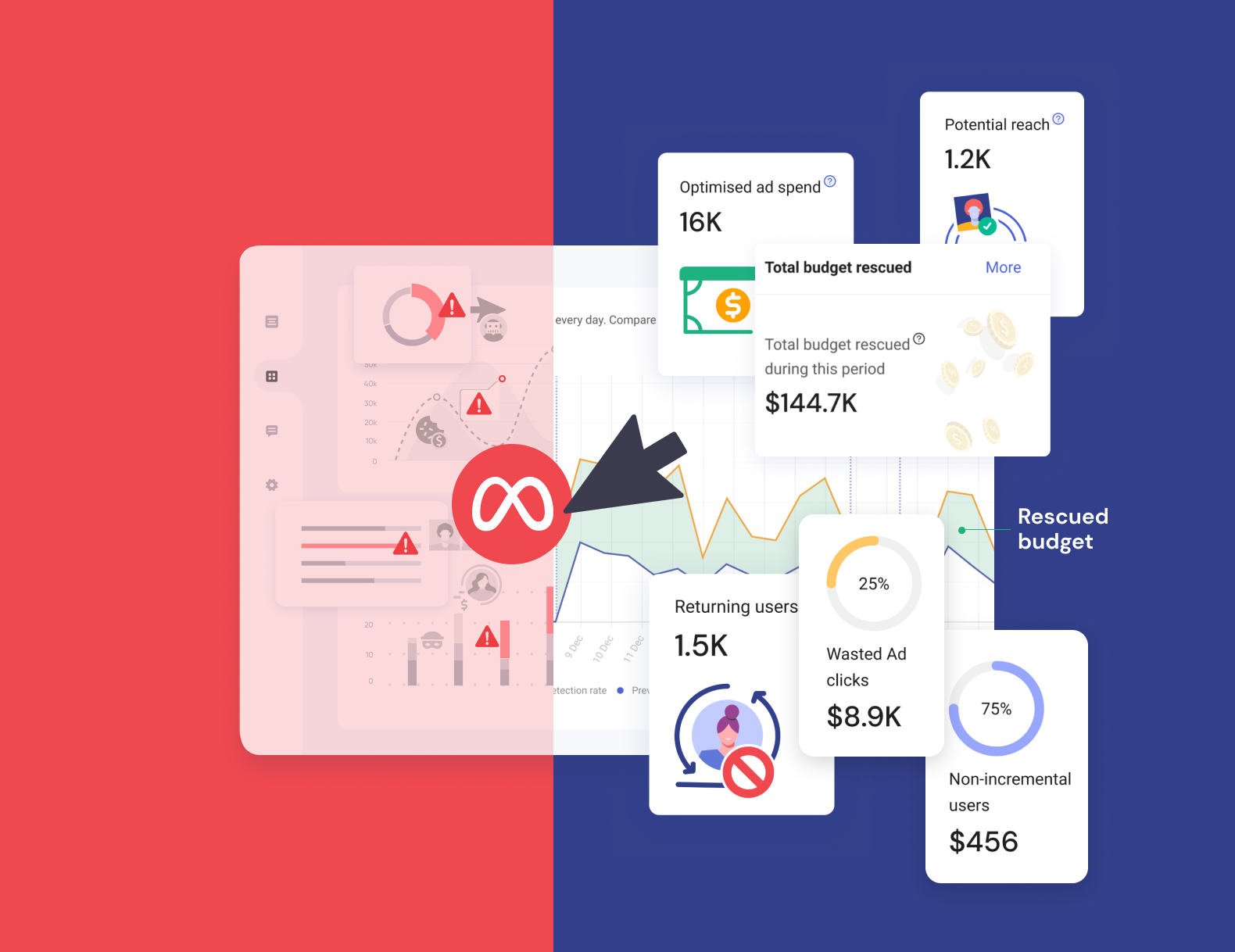
If you manage Meta campaigns at scale, you’ll know how it feels to stare at impressive-looking numbers that don’t quite add up. Clicks are strong, engagement looks high, but conversions? Not so much.
It’s the marketer’s version of déjà vu…great data on the surface, but something’s off underneath. Often, the real issue is invalid traffic. Bots, repeat users, and low-intent clicks distort performance and quietly drain ROI. This is where click fraud protection becomes critical to maintaining accurate performance data and protecting budget.
This is exactly what our TrafficGuard for Social Meta Audit uncovers.
Our two-week audit is built for enterprise teams who want clarity, not guesswork. In just 14 days, you will see where every pound is spent, which audiences are driving real outcomes, and how much budget could be reclaimed once prevention kicks in.
Seeing the Real Picture: The Traffic Overview
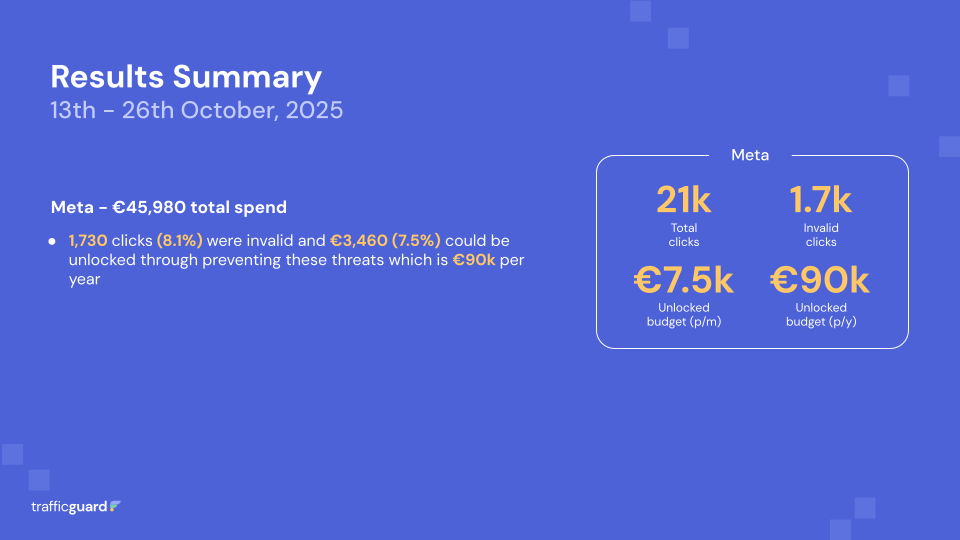
Every audit review report starts with a clear, visual snapshot of total clicks, impressions, and spend. However, the real insight lies beneath those numbers.
We show how much of your engagement is invalid, giving you a true picture of campaign health and where performance is being skewed.
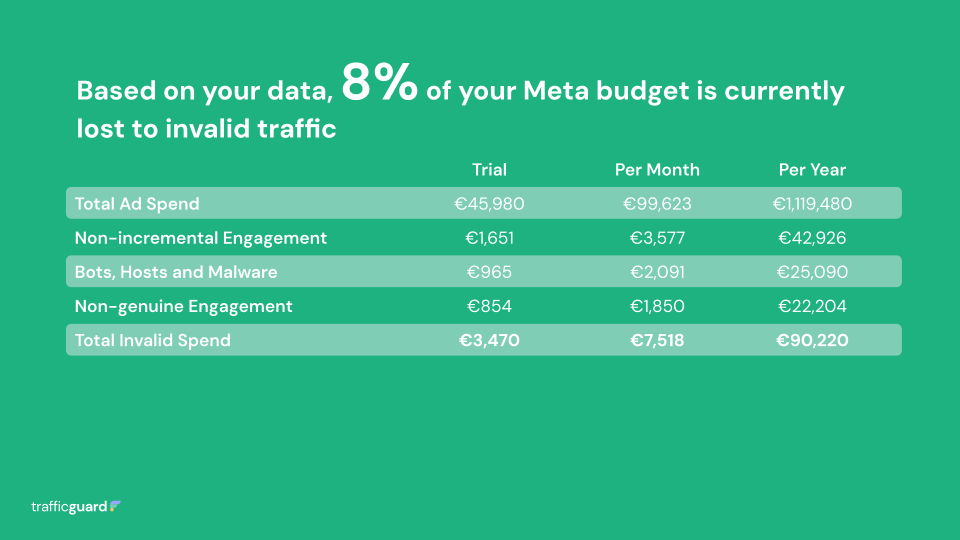
In one enterprise audit, £45,980 in Meta spend generated over 21,000 clicks. Of those, 8.1% were invalid, that is £3,470 in wasted spend across just two weeks. Left unchecked, that is more than £90,000 a year lost to traffic that never had a chance to convert.
For marketers, that’s not just a data problem, it’s a performance leak hidden behind “good” metrics.
Across enterprise advertisers, invalid traffic on Meta typically ranges between 7% and 10%, depending on vertical and region. Even at the lower end, it is a costly problem and completely preventable.
Who’s Behind the Invalid Engagement
Once you have the bigger picture, the audit report digs deeper to show who is actually behind those clicks.
Invalid activity typically falls into three main categories: non-incremental engagement, bots and hosts, and non-genuine users. Each is surfaced within your own campaign data, so you can see exactly what is happening behind the numbers.
Non-incremental engagement
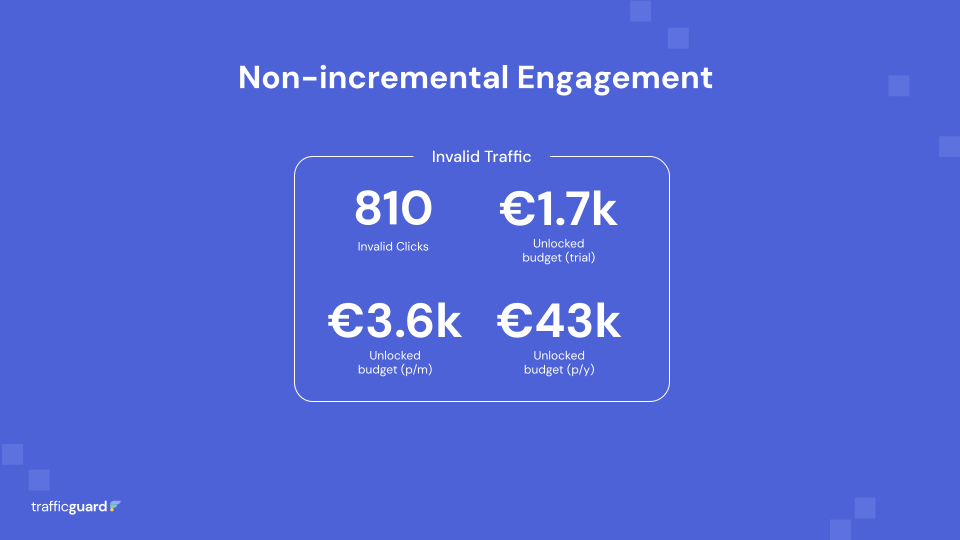
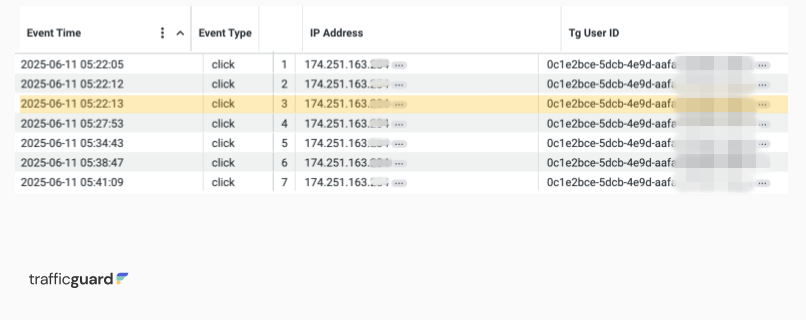
Sometimes it’s not fraud, it’s repetition. Users clicking the same ad again and again within short timeframes, without ever converting.
In one audit, a single user clicked the same ad seven times in one day, costing the advertiser £50.26 with no conversions. These repeated clicks make engagement look higher than it really is but do not deliver any real results.
In Prevention Mode:
TrafficGuard applies click frequency rules that limit how many times the same user can click your ads. This helps stop wasteful repetition and keeps your budget focused on new users who are more likely to convert.
Bots, hosts and malware
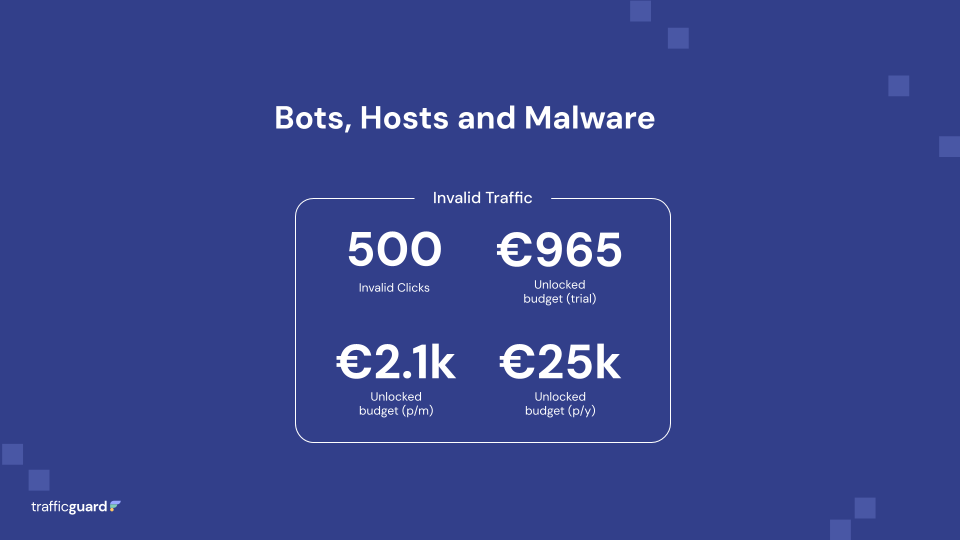
Sometimes it’s not a person at all. Automated programmes and infected devices often mimic legitimate clicks and engagement. They look like real users, but never convert.
In one review, £1,073 of spend came from host servers linked to data centres known for fraudulent activity; fake engagement that looked perfectly normal in Meta’s reporting.
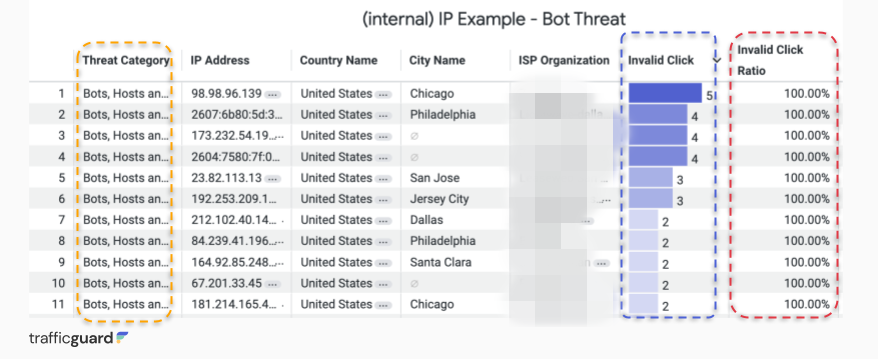
In Prevention Mode:
TrafficGuard automatically detects and blocks these sources before they corrupt optimisation data, ensuring your Meta algorithm learns only from verified human engagement.
Non-genuine engagement
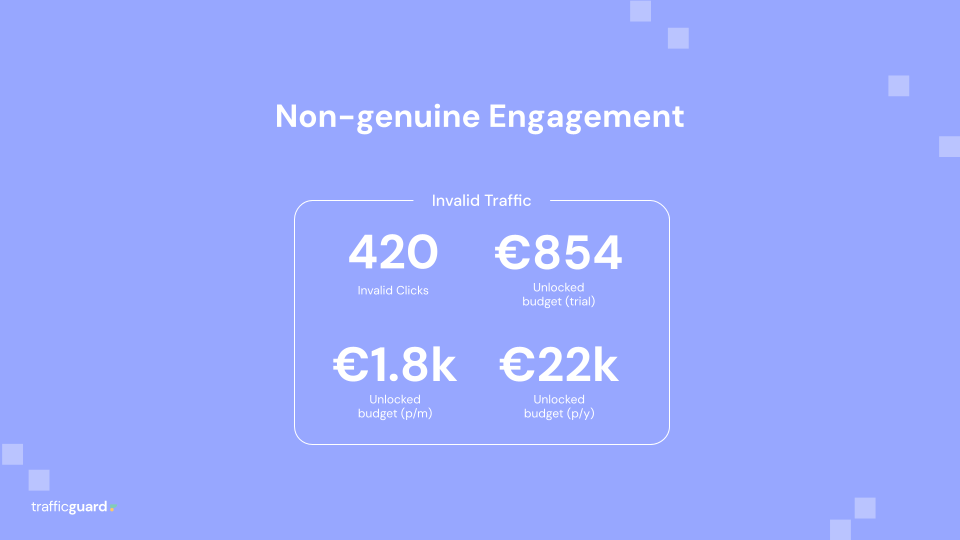
Then there are users who appear real but behave abnormally such as rapid-fire clicking, no conversions, and barely any time on site.
In one audit, a single user clicked 36 times over 14 days without a single conversion. The behaviour showed repeated engagement across multiple ads within short intervals and no meaningful interaction.

In Prevention Mode:
TrafficGuard analyses behavioural and device-level signals in real time to identify and filter these low-intent interactions, keeping campaigns focused on verified, high-quality audiences.
See how the audit works in practice.
Watch this short walkthrough of the TrafficGuard dashboard to see exactly what advertisers receive during a two-week Meta audit and how traffic quality is analysed.
From Audit to Action: Turning Data into ROI
The Meta Audit is not just about diagnosis. It is about direction.
Once the two-week review is complete, your team sees exactly how much of your budget can be recovered by switching on Prevention Mode. Every invalid source identified during the audit is automatically excluded, helping optimisation clean itself up and perform more efficiently.
The impact is immediate: cleaner data, lower CPCs, and stronger conversion accuracy.
In this enterprise case, activating prevention unlocked more than £90,000 per year in recovered budget, money that was quietly disappearing into clicks that never mattered.
Post-audit performance trends
Enterprise advertisers who activate prevention typically see:
- CPCs drop by 8–15% within the first month
- Remarketing accuracy increase significantly
- Cleaner optimisation data driving stronger ROI
TrafficGuard also runs a follow-up review to track improvements and measure ROI uplift after prevention is live.
How Protection Rules Work Behind the Scenes
Marketers often ask what happens behind the scenes once prevention is active. Here’s how TrafficGuard’s protection rules keep campaigns efficient across the Meta ecosystem:
- Account-level protection
Exclusion rules are applied across your Meta account, so every campaign from prospecting to remarketing will benefit from unified protection. - Automatic refresh cycle
Exclusions reset every 14 days to keep detection adaptive for seasonal or short-term campaigns. - Custom click thresholds
The default threshold for clicks can be customised to suit campaign objectives and control this behaviour. - Cross-platform consistency
Detection spans Facebook, Instagram, and Audience Network, treating cross-channel users as a single entity for accuracy. - Future-ready upgrades
New event-based exclusion logic is being developed to suppress ads to known customers automatically, reducing wasted impressions and improving user experience.
Why Marketers Choose the Meta Audit
The Meta Audit gives teams both clarity and control.
Here’s what most enterprise advertisers take away:
- Visibility: A transparent view of every click, impression, and audience path
- Accuracy: Real conversion data without bot or repeat-user noise
- Efficiency: Typically 5–10% of ad spend recovered and reinvested
- Performance: Cleaner signals powering smarter optimisation
- Confidence: Every ad delivered to a verified, high-intent user
“The audit gave us clarity on what was really driving clicks. Seeing bots and repeat users mapped visually helped us clean up our Meta performance fast.”
– Head of Online Marketing, European Betting Operator
It’s not about chasing fraud, it’s about building campaigns marketers can finally trust.
What Happens Next
At the end of the two weeks, you’ll receive a detailed audit report showing invalid traffic rates, wasted spend, and potential savings.
From there, you can either activate Prevention Mode to protect campaigns in real time or use the Detection Mode insights to fine-tune your strategy.
Either way, you finish the audit with clear, trustworthy data and a roadmap for improvement.
If you’d like to keep improving performance beyond the audit, our guide to social ad optimisation strategies for more practical tips.
Ready to See What’s Really Happening Behind Your Meta Campaigns?
In just 14 days, you’ll see the full story behind your ad spend, where your budget is going, what’s genuine, and what’s not.
→ Book your Two-Week Meta Audit | TrafficGuard
FAQs & Key Takeaways
1. What is TrafficGuard’s Meta Audit and how does it work?
It is a two-week diagnostic that analyses every click and conversion across your Meta campaigns. The audit identifies invalid traffic such as bots, repeat users, and low-intent clicks, and shows how much of your ad spend can be recovered once these sources are filtered out.
2. What level of invalid traffic is normal on Meta?
Across enterprise advertisers, invalid traffic typically ranges between 7% -10% depending on industry and region. This sits within a normal range, but some accounts see much higher levels depending on vertical and targeting.
3. How much can marketers typically recover after enabling Prevention Mode?
Most enterprise teams recover between 5% - 10% percent of their ad spend. They also see CPCs drop by 8% - 15% within the first month of activation and remarketing accuracy improve significantly.
4. What is the difference between Detection Mode and Prevention Mode?
Detection Mode identifies invalid activity and reports on it but does not alter your live campaigns. Prevention Mode automatically blocks fake clicks, bots, and non-genuine engagement in real time, protecting your budget and data quality.
5. How are exclusion rules applied across campaigns?
All rules are applied at the account level. This means every campaign within your Meta account, from brand to performance, is protected consistently and benefits from cleaner optimisation data.
6. Can I exclude specific campaigns from prevention rules?
Not at the moment. Meta prevention is managed at the account level for consistency and to ensure complete coverage.
7. What is the default click threshold and can it be changed?
This can be customised based on your goals. Our Customer Success Manager will advise on any adjustments after initial results.
8. What happens if our ad spend increases significantly?
TrafficGuard’s pricing covers an agreed annual spend volume. If your spend increases, such as during major events, your Customer Success Manager will contact you to extend coverage under the same percentage rate.
9. Do we need to create new campaigns or shadow setups to use Prevention Mode?
No. There are no shadow campaigns required. Prevention runs at account level and automatically applies to all existing campaigns once enabled.
10. What happens after the Meta Audit ends?
At the end of the two-week audit, you receive a detailed report showing your invalid traffic rate, wasted spend, and potential savings. You can then activate Prevention Mode immediately or use the insights to refine your strategy.
Get started - it's free
You can set up a TrafficGuard account in minutes, so we’ll be protecting your campaigns before you can say ‘sky-high ROI’.

Explore More Blogs



Subscribe
Subscribe now to get all the latest news and insights on digital advertising, machine learning and ad fraud.


