

Mid-Audit Check-In: What Is Really Hiding in Your Search Data

Halfway through a TrafficGuard audit review, something changes. The clicks stop being abstract numbers, and patterns begin to reveal themselves. You start to see which users are genuine, which are bots, and which and which clicks were nothing but wasted spend hiding in plain sight.
This is the moment where visibility replaces assumption, and where click fraud protection starts to take shape within your data. It is when marketers finally see campaigns as they truly are, instead of how the ad platform portrays them.
The Mid-Audit Moment
The purpose of a mid-audit check-in is clarity. It is not about optimisation at this stage. It is about understanding what is really happening inside your campaigns.
By the second week, the dashboard begins to paint an honest picture of your traffic. For many marketers, this is the point of truth. Budgets that once appeared to be performing well often reveal a very different story.
In one eCommerce client’s audit, more than 34% of spend was being lost to invalid traffic. Some came from bots. Some came from hyper engaged users clicking excessively at all times of the day .Some were the result of automated rules pushing ads to people who were already on their way, users who would’ve come through organically without spending a cent.
What you get at this stage is not another dataset. It is visibility.
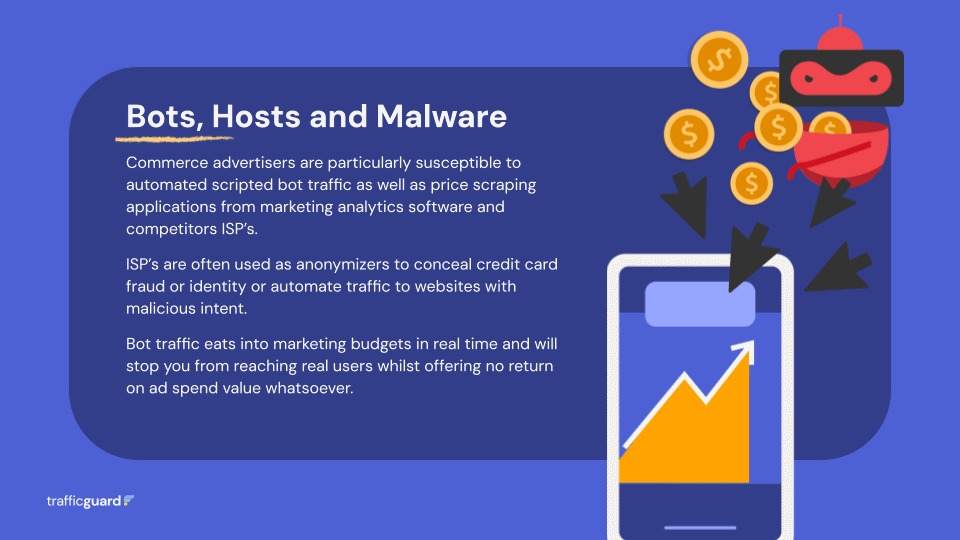
1. Seeing the Invisible: Bots, Hosts and Malware
The first insight most marketers notice is how much traffic is not human at all.
Inside the dashboard, these appear as clicks from hosting providers, anonymised devices and automated scripts that mimic real engagement but never convert.
In this audit, a single IP address generated more than thirty clicks in under a minute. Each click consumed budget, inflated engagement metrics and fed campaign reporting with false signals.
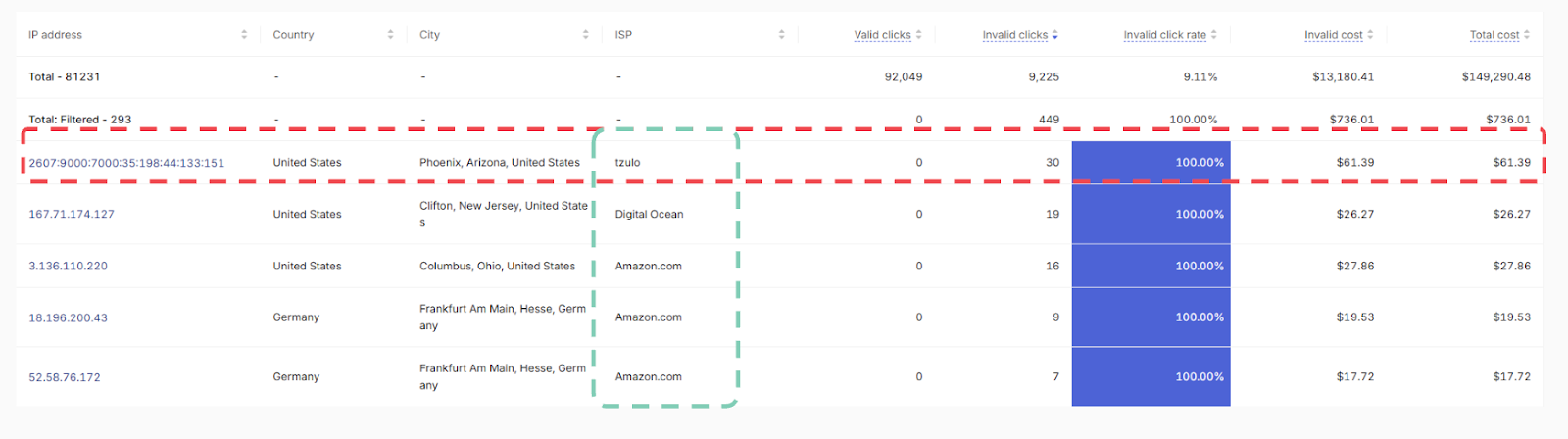
TrafficGuard identifies these behaviours in real time and excludes them from the auction before they ever reach your campaigns, redirecting your spend back to genuine users instead of automated noise.
2. The Surprising Cost of Repeat Clickers
Not every source of waste is malicious. Many advertisers discover that their largest leak is loyal customers or hyper-engaged users.
These are genuine users who already intended to come back; they’re simply using search as a lazy navigation path, hitting your paid ad instead of the organic link they would’ve chosen naturally.
In one retailer audit, a single user clicked 31 times in a single day. Every click was charged. None added incremental value.
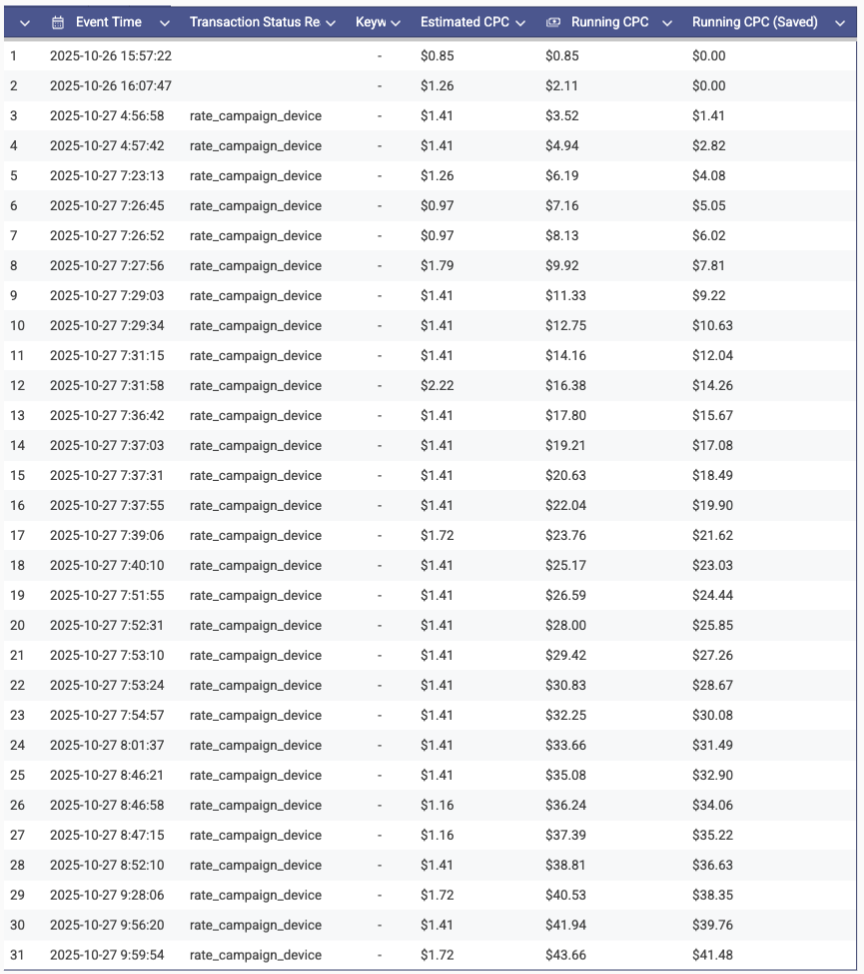
Branded campaigns are often responsible for this pattern. Customers type your brand name into Google, click the first result, and repeat the behaviour each time they return. It feels familiar, but it consumes ad budget that could have been directed toward acquiring new customers.
With TrafficGuard, repeat clicks can be capped automatically. You can set a threshold for the number of clicks and these users will be redirected through organic search or a lower-cost shadow campaign. The result is improved CPAs, cleaner attribution and spend that focuses on acquiring new customers rather than paying for known ones.
3. Non-Genuine Engagement: The Quiet Performance Killer
Some behaviours appear legitimate at first glance but are not.
Clicks that bounce within seconds, devices pretending to be something they are not, or identical ad IDs reused across multiple sessions all distort optimisation logic.
In this audit, repeated Google Ads IDs revealed scripts replaying the same ad URLs. Other users claimed to be on desktop devices but displayed mobile CPU patterns.

Individually, these behaviours seem small. Together, they train your campaigns on inaccurate signals. Removing these interactions ensures that bidding decisions are based on clean, trustworthy data rather than noise.
4. Turning Insight into Action
The mid-audit check-in is not only about identifying the issues. It is the point where actions become clear.
By this point in the trial, the dashboard starts to reveal how invalid traffic is impacting performance. While the full report comes next, you can already see:
- How much of your budget is absorbed by invalid activity
- Which users are driving clicks that don’t deliver real value
- Campaigns with metrics polluted by clicks that will never convert
- Early signs of wasted spend and potential recovery
5. Beyond the Click: Real-World Behaviour Patterns
Some of the most revealing mid-audit discoveries are not fraudulent at all. They are human.
- Recent buyers returning to compare prices after checkout≠≠
- Distracted users clicking the same ad repeatedly while switching between apps
- Repeat visitors using Google as a convenient entry point to your website
Each action makes sense from a user perspective, but each one drains budget without contributing new value.
With the TrafficGuard tag deployed, these users can be identified and excluded for a chosen period after purchase or repeated engagement. This protects your ad budget and helps ensure that campaigns focus on acquiring incremental conversions.
6. The Bigger Picture: Efficiency Unlocked
When the mid-audit findings are annualised, the impact becomes impossible to ignore.
In one audit, the data showed more than $685,000 in recoverable spend, resulting in a 21x ROI once prevention was enabled.
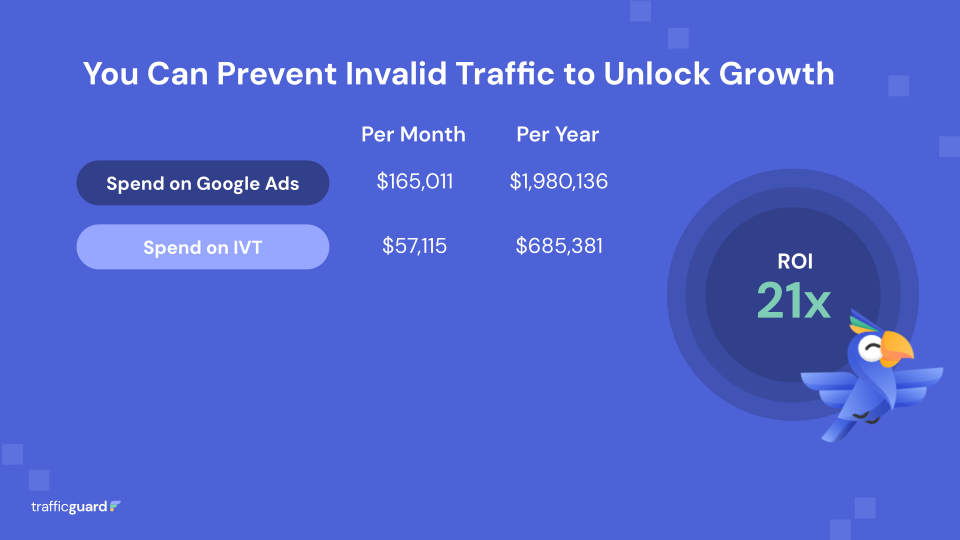
This is not an outlier. It is what happens when you stop optimising on noise and start operating with clean data.
It is the moment where confidence returns. You finally know where your budget is going.
You can clearly see the difference between clicks that convert and clicks that simply don’t.
7. What You Will Take Away from Your Own Check-In
Every TrafficGuard audit tells a slightly different story, but the outcomes are consistent. By the mid-audit stage, you will have:
- A transparent view of how much spend is lost to invalid or non-incremental traffic
- Real examples you can trace to the click level
- A clear ROI model showing recovery potential with prevention enabled
- Confidence in your campaign data again
During the trial, Detection Mode lets you look under the hood to understand your exposure to invalid traffic and justify the move to Prevention. When Prevention Mode is activated, the system adapts automatically as your campaign behaviour evolves.
Over 200 datapoints are monitored in real time to ensure clicks are genuine, audiences are optimised, and campaign performance remains effective, without daily manual checks. Unlike other vendors, TrafficGuard provides full transparency, giving you all the details behind why a click or user is flagged as invalid for independent validation.
FAQs and Key Takeaways
1. Do I need to monitor everything manually or manage exclusions daily?
No. Once prevention is enabled, TrafficGuard applies all exclusion rules automatically. The system monitors users and invalid traffic continuously, updating thresholds without manual intervention.
2. Can we change click frequency rules after activation?
Yes. You can adjust the click frequency threshold at any time. You can lower thresholds for branded campaigns, extend exclusion windows for post-purchase users or create campaign-specific rules.
3. Can we exclude users based on engagement signals such as time on site or bounce rate?
Yes. The TrafficGuard JavaScript tag tracks session time, scroll depth and conversion behaviour. These signals can inform exclusions for low-intent visitors.
4. Can I limit how much I spend on a single user?
Yes. You can combine average CPC with click frequency rules to set an effective spend ceiling. For example, if your CPC is £5, setting an eight-click cap limits spend to roughly £40 per user.
5. How does TrafficGuard detect and block bots?
Bots are flagged through real-time analysis of IP ranges, device mismatches, abnormal click speed and behavioural anomalies. When detected, they are blocked instantly, and their IP clusters are suppressed.
6. What if bots rotate IP addresses or use data centres to hide?
TrafficGuard identifies and suppresses entire IP clusters associated with bot networks. These clusters are continuously updated to prevent attackers from reusing them at scale.
7. Can I view which bots or invalid users were blocked?
Yes. The dashboard provides full transparency, including user IDs, IP data, device details and timestamps for each invalidated click.
8. Does TrafficGuard work for Performance Max and Meta as well?
Yes. The same protection applies across Google Search, Performance Max and Meta. Invalid users are removed from targeting through dynamic audience updates and user-level suppression.
9. Can we match invalid clicks to users in our CRM?
Yes. Every click carries a unique GCLID, which can be matched automatically once the TrafficGuard tag is installed.
Get started - it's free
You can set up a TrafficGuard account in minutes, so we’ll be protecting your campaigns before you can say ‘sky-high ROI’.

Explore More Blogs

Subscribe
Subscribe now to get all the latest news and insights on digital advertising, machine learning and ad fraud.


