

How to Improve Your Google Ads Optimisation Score: A Practical Guide for 2026

Your Google Ads Optimisation Score sits at 72%. Google is recommending Smart Bidding, three new ad extensions, and a handful of additional keywords. Before you apply a single one: are you sure the data behind those recommendations is real?
That is not a rhetorical question. It is the most important thing a performance marketer can ask about their Google Ads account, and one that almost every guide on this topic ignores.
This blog does not. It covers what the Optimisation Score is, how it is calculated, and why chasing a higher number without auditing your traffic data first is a reliable route to wasted budget. Then it gives you a six-step framework for improving the score in a way that produces real performance gains, starting with the one step every other guide skips.
Google's own data shows a 10-point Optimisation Score increase delivers a median 14% uplift in conversions. That number matters. It only holds when the conversion data behind the score reflects real users.
What is Google Ads Optimisation Score? Definition and key facts
The Google Ads Optimisation Score is a real-time estimate of how well your account is set up to perform. It sits between 0 and 100% in the Recommendations tab and updates continuously as your campaign settings, budgets, and available recommendation types change.
It is not a static audit. According to Google's official documentation, the score reflects the live gap between your current configuration and what Google's systems consider optimal for your account, based on your performance history and signals across similar campaigns.
The implication is straightforward: the score is only as accurate as the data feeding it.
How Google calculates your Optimisation Score in real time
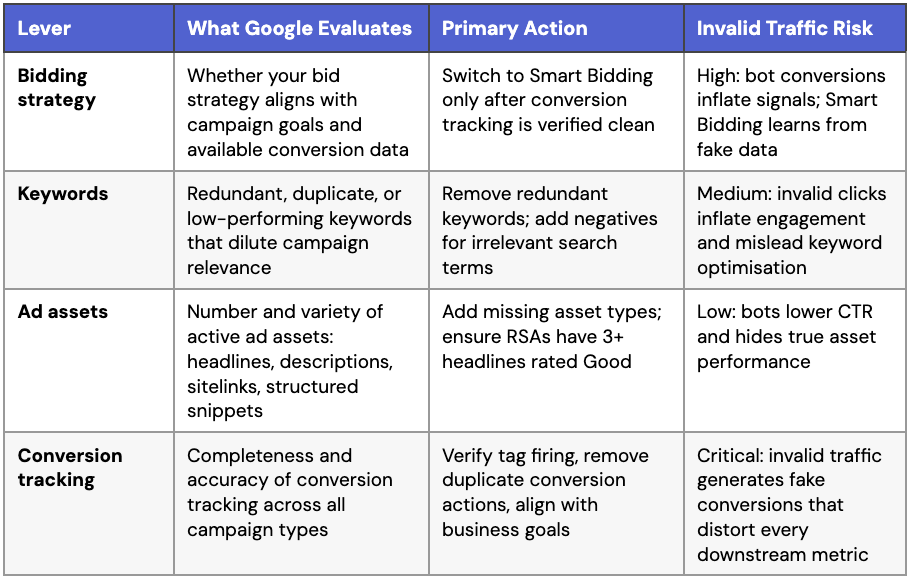
Google uses machine learning to evaluate your account across four areas: bid strategy, keyword structure, ad asset coverage, and conversion tracking. Each recommendation it surfaces carries a projected score impact. Apply the recommendation, and your score rises by that projected amount.
Every recommendation is generated from your account's live performance data: CTR, conversion rate, impression share, audience behaviour. All of it flows into the model. If that data has been corrupted by invalid traffic, every input is wrong, and every recommendation built on it is wrong too. A high score built on dirty data is not a win. It is a liability.
Optimisation Score vs. Quality Score: key differences
These two metrics are routinely confused. Both affect campaign performance, but they operate at entirely different levels of your account and measure entirely different things.
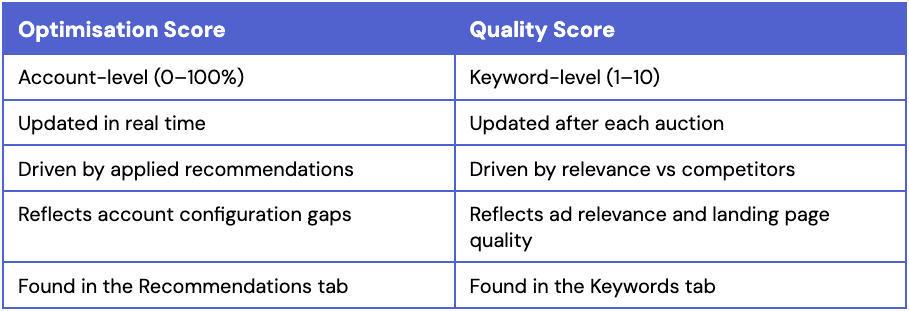
Improving your Quality Score will not raise your Optimisation Score. They are separate diagnostic tools, not interchangeable ratings. Treat them accordingly.
What is a Good Optimisation Score in Google Ads
Optmyzr's study of 17,000+ accounts found that accounts above 70% consistently outperformed lower-scoring accounts on core metrics. Most practitioners aim for 80% and above.
The caveat:
A high score means Google's recommendations have been applied. It does not mean those recommendations were right for your business, or built on data you can trust. A campaign with a 95% score built on fraudulent conversions will still underperform. The number is a diagnostic input, not a performance guarantee.
Why your Optimisation Score can be misleading
How invalid traffic affects your ROAS and campaign performance is one of the least-discussed variables in Google Ads optimisation. It should be the first thing you consider.
The Optimisation Score is only as reliable as the data feeding it, which is why click fraud protection is not just a defensive tactic but a prerequisite for accurate optimisation. If your campaigns are receiving material volumes of invalid traffic from bots, click farms, or fraudulent activity, your performance data is compromised at the source. CTR is inflated. Conversions are fabricated. Audience signals are skewed. Smart Bidding is learning from all of it.
When invalid traffic corrupts your performance signals, every optimisation decision downstream becomes unreliable. The Optimisation Score is one of the most visible casualties.
When Google’s recommendations work against you
Google's Recommendations tab is built for accounts operating on clean traffic. In those conditions, applying recommendations consistently produces real performance gains, which is exactly what the +14% conversion uplift figure reflects.
In accounts with unaddressed invalid traffic, the same process runs in reverse. Google reads inflated CTR as genuine demand and recommends higher bids. You increase bids. Higher bids mean more exposure. In fraud-affected environments, more exposure means more invalid clicks. Costs rise. Genuine conversions do not. Your score improves while campaign performance deteriorates.
Every recommendation is a hypothesis, not a directive. Evaluate it against your actual business goals before applying it.
How invalid traffic corrupts the data behind your score
A campaign receiving 30% invalid traffic will show inflated CTR across all match types. Google reads that as strong demand and recommends broader match types to capture more volume. You apply it. Your score rises. Broader match types attract more invalid traffic. The problem compounds, invisibly.
Meanwhile, your conversion tracking records every bot-triggered form submission or pixel fire as a genuine customer action. Smart Bidding trains on those signals and optimises toward what invalid users are doing, not your actual customers.
The scale is not trivial. TrafficGuard's click fraud statistics show invalid traffic continues to drain significant PPC budget globally. The IAB's Invalid Traffic Standards define two tiers of invalid traffic, general (GIVT) and sophisticated (SIVT), both of which contaminate performance data in ways standard platform reporting will not surface.
Why cleaning your traffic is Step 0 before optimising
No framework produces reliable results on corrupted data. Before you touch a single recommendation, protect your Google Search campaigns and confirm that your performance data reflects real users.
Cleaning your traffic first means every subsequent decision, whether that is bid strategy changes, keyword restructuring, or conversion tracking fixes, is built on data you can trust. The Optimisation Score you reach after that process means something. The one you reach without it does not.
The 4 Levers Behind Optimisation Score And How Invalid Traffic Distorts Them
Google’s Optimisation Score is primarily shaped by four areas: bidding strategy, keywords, ad assets, and conversion tracking.
Most guides explain how to improve these levers in isolation. The problem is that Google evaluates all four using live campaign data. If that data is distorted by invalid traffic, every recommendation generated from it becomes less reliable.
This is where many optimisation strategies break down.
Invalid traffic does not just waste budget. It changes how Google interprets campaign performance. Inflated CTRs influence keyword recommendations. Fake conversions corrupt Smart Bidding signals. Poor-quality traffic skews asset performance data and weakens optimisation decisions downstream.
Understanding the four levers matters. Understanding how invalid traffic interferes with them matters more.
Lever 1: Bidding Strategy (highest weight)
Bidding strategy carries the greatest weight in Optimisation Score calculations. Google's primary recommendation across most accounts is to move from manual CPC to Smart Bidding using Target CPA or Target ROAS, on the basis that automated bidding outperforms manual in data-rich environments.
The qualifier is critical. Smart Bidding needs a sufficient volume of clean conversion data to learn from. Google recommends at least 30 verified conversions per month at campaign level before switching to Target CPA. If those conversions include a meaningful proportion of bot-triggered events, Smart Bidding will optimise toward the wrong behaviour from day one.
Apply this lever last. After conversion tracking is verified. After invalid traffic is addressed.
Lever 2: Keywords and match types
Google flags redundant, duplicate, and underperforming keywords as drags on your score. The fixes are straightforward in principle: consolidate duplicates, add negative keywords to cut irrelevant queries, tighten match types to improve campaign relevance.
The risk here is medium. Invalid clicks on broad match terms distort the data Google uses to assess which keywords are underperforming. A term may look weak not because it is a poor fit, but because a high proportion of its clicks are invalid. Removing it based on that data removes a potentially valuable keyword.
Keyword hygiene is worth doing. Do it after a traffic quality audit.
Lever 3: Ad assets and Responsive Search Ads
Ad asset coverage affects your Optimisation Score directly. Google expects active sitelinks, callouts, structured snippets, and promotion extensions across campaigns. For Responsive Search Ads, a minimum of three headlines rated Good or Excellent is the baseline.
The direct invalid traffic risk here is low. Bots do not interact with ad copy in ways Google tracks as asset performance signals. The indirect risk is real: bot-suppressed CTR makes strong assets look weak in performance reports. Optimising based on those reports risks replacing copy that is genuinely effective with real audiences.
Lever 4: Conversion tracking and data accuracy
Conversion tracking accuracy is the foundation of every downstream decision, from Smart Bidding signal quality to audience list building to Performance Max campaign learning. This lever carries the highest downstream risk if left unaddressed.
Common errors include duplicate conversion actions, misconfigured tag firing, tracking test purchases as live conversions, and misaligned conversion goals. Any of these inflate reported conversion volume independently of invalid traffic.
When invalid traffic is also present, the compounding effect is severe. Every bot-triggered event that fires your tag is recorded as a genuine customer action. Fix this lever before anything else.
How to improve your Google Ads Optimisation Score: step-by-step
Steps 1 through 3 are preconditions. Not optional preparation. Preconditions. Steps 4 through 6 are execution. Running them in the wrong order is the most expensive mistake you can make here.
Step 1: Audit your traffic quality first
Before applying any Google recommendation, establish whether your performance data is trustworthy. Look for the signs of ad fraud in your account: high CTR with low conversion rates, conversion spikes without corresponding revenue, traffic concentrated in unusual geographies, and engagement metrics that contradict each other.
This is where click fraud protection becomes operational, not theoretical. Without knowing whether your clicks are genuine, every optimisation decision that follows is built on assumptions.
TrafficGuard’s 2-week PPC Audit gives you a clear, data-driven answer: is invalid traffic corrupting your account at a level that would undermine your optimisation? If it is, address it before moving to Step 2.
Optimising on dirty data is not optimising. It is accelerating the problem.
Step 2: Prioritise recommendations that align with your business goals
Not every recommendation deserves to be applied. The Recommendations tab generates suggestions from statistical patterns across millions of accounts. Your account has specific conversion goals, margin targets, and customer acquisition costs that a generalised algorithm cannot fully account for.
Before acting on any recommendation, run it through three questions: Does this align with my primary conversion goal? Does it fit my current budget and margin structure? Does it require conversion data volume I do not yet have?
Dismiss recommendations that fail these tests, and do it confidently. Dismissed recommendations are removed from the score calculation entirely. They do not permanently penalise your account. An irrelevant recommendation you will not implement should not define your score.
Step 3: Fix conversion tracking before touching bids
This is the single highest-impact action available in most Google Ads accounts. Conversion tracking errors are common and almost always invisible until you look for them.
Check that your conversion tag fires on the confirmation page, not on any intermediate step. Look for duplicate conversion actions in your account settings: two actions tracking the same event will double-count every conversion and inflate the numbers across every report you use to make decisions. If you are importing from Google Analytics, verify cross-domain tracking configuration and confirm session definitions are consistent between platforms.
Remove conversion actions tracking internal traffic, test events, or bot activity. Once tracking is clean, Smart Bidding has the signal quality it needs. Not before.
Step 4: Clean up keywords (redundant, duplicate, low-performing)
With clean traffic data and accurate conversion tracking in place, keyword hygiene becomes a reliable exercise. Review each campaign for duplicate keywords across ad groups, which dilute budget and create internal auction competition. Identify redundant keywords that overlap in intent without adding reach.
Build your negative keyword lists from the search terms report. Find queries generating clicks but no conversions. Add them as exclusions at campaign level first, then refine to ad group level where the pattern justifies it. Cleaner match type coverage and tighter negatives improve impression share quality, which feeds directly into your Optimisation Score.
Step 5: Add and optimise ad assets systematically
Ad asset coverage is one of the faster Optimisation Score gains available because it is within your direct control, regardless of external data quality. Run an asset audit across campaigns: sitelinks (minimum four), callouts (minimum four), structured snippets (at least one set), and promotion extensions where relevant.
For Responsive Search Ads, target a minimum Ad Strength rating of Good. That requires at least eight distinct headlines and four description lines with meaningful variation. Do not repeat the same keyword across headline positions. Use pinning sparingly: pinned positions reduce Google's ability to test combinations and can suppress your score.
On mobile, ensure sitelinks and callouts are short enough to display without truncation. Mobile Ad Strength is evaluated separately and its weight is growing as mobile search share increases.
Step 6: Review and manage recommendations regularly
Optimisation Score updates in real time. New recommendations appear as your campaigns change. Old ones become irrelevant as your goals shift. Build a review cadence: monthly at minimum, weekly for high-spend accounts.
At each review, assess which new recommendations have appeared, which remain aligned with your goals, and which should be dismissed. Use Google Ads Editor for bulk management across large accounts.
For accounts on automated bidding: any significant change to conversion tracking, budget, or targeting resets the Smart Bidding learning window. Monitor that recalibration period closely. Performance typically dips before it recovers.
Dismissed recommendations do not disappear. They are stored in a separate view within the Recommendations tab. Revisit them quarterly. Goals change, budget conditions change, and a recommendation that was irrelevant three months ago may now be worth applying.
Frequently Asked Questions
Does dismissing recommendations permanently lower your Optimisation Score?
No. Dismissed recommendations are removed from the calculation entirely. Your score reflects only the recommendations that are active and applicable right now. Dismissing suggestions that do not fit your business goals is the correct approach, and your score adjusts to reflect only the remaining relevant recommendations.
How often should I check my Optimisation Score?
Monthly for most accounts. Weekly for high-spend accounts or campaigns in active testing. At each review, focus on new recommendations since your last session, filter them against your conversion goals and budget constraints, and revisit previously dismissed items in case conditions have changed.
Can invalid traffic affect Smart Bidding performance?
Yes, significantly. Smart Bidding learns from your conversion history. If a material share of those conversions came from bots or fraudulent activity, Smart Bidding will optimise toward that behaviour rather than genuine customer actions. The result is a bid strategy calibrated to attract invalid users. Verified conversion tracking and effective click fraud protection are prerequisites for Smart Bidding, not optional extras.
What is the difference between Optimisation Score and Ad Strength?
Optimisation Score is account-level (0–100%) and reflects the gap between your current setup and Google's recommended configuration across bidding, keywords, assets, and tracking. Ad Strength is ad-level (Poor to Excellent) and applies specifically to Responsive Search Ads, measuring headline and description variety. Strong Ad Strength contributes to the asset lever of your Optimisation Score, but improving Ad Strength alone will not move the overall number significantly.
Does Optimisation Score affect Ad Rank?
No. Optimisation Score is a diagnostic tool, not an Ad Rank input. Ad Rank is determined by your bid, Quality Score, auction-time signals, and the expected impact of your extensions. A high Optimisation Score does not guarantee better Ad Rank. Its value is indirect: a well-configured account tends to produce stronger conversion data and better audience signals, which improve bidding efficiency and Quality Score over time.
What impact does click fraud have on my Optimisation Score?
Click fraud does not lower your Optimisation Score directly. It does something more damaging: it corrupts the data the score is calculated from. Fabricated conversions, inflated CTR, and distorted audience signals cause Google to generate recommendations that look logical but are calibrated to fraudulent traffic. You apply them, your score improves, your actual performance does not. Click fraud protection breaks that cycle before it starts.
Should I auto-apply Google Ads recommendations?
Auto-apply can be useful for low-risk changes such as adding responsive search ad assets. For anything involving bid strategy or match type expansion, manual review is essential. If your account has unresolved invalid traffic or unverified conversion tracking, auto-applying recommendations risks amplifying bad signals at scale. Audit your data quality before enabling auto-apply on anything bid-related.
How do Performance Max campaigns affect my Optimisation Score?
PMax campaigns are included in your overall account Optimisation Score. Google generates PMax-specific recommendations around asset group coverage, audience signals, and budget allocation. The data quality principle applies equally: PMax relies heavily on automated signals to target and bid. Invalid traffic entering through PMax placements corrupts the learning that underpins those campaigns. Monitor PMax traffic quality with the same rigour you apply to standard campaigns.
Get started - it's free
You can set up a TrafficGuard account in minutes, so we’ll be protecting your campaigns before you can say ‘sky-high ROI’.

Explore More Blogs


Subscribe
Subscribe now to get all the latest news and insights on digital advertising, machine learning and ad fraud.


