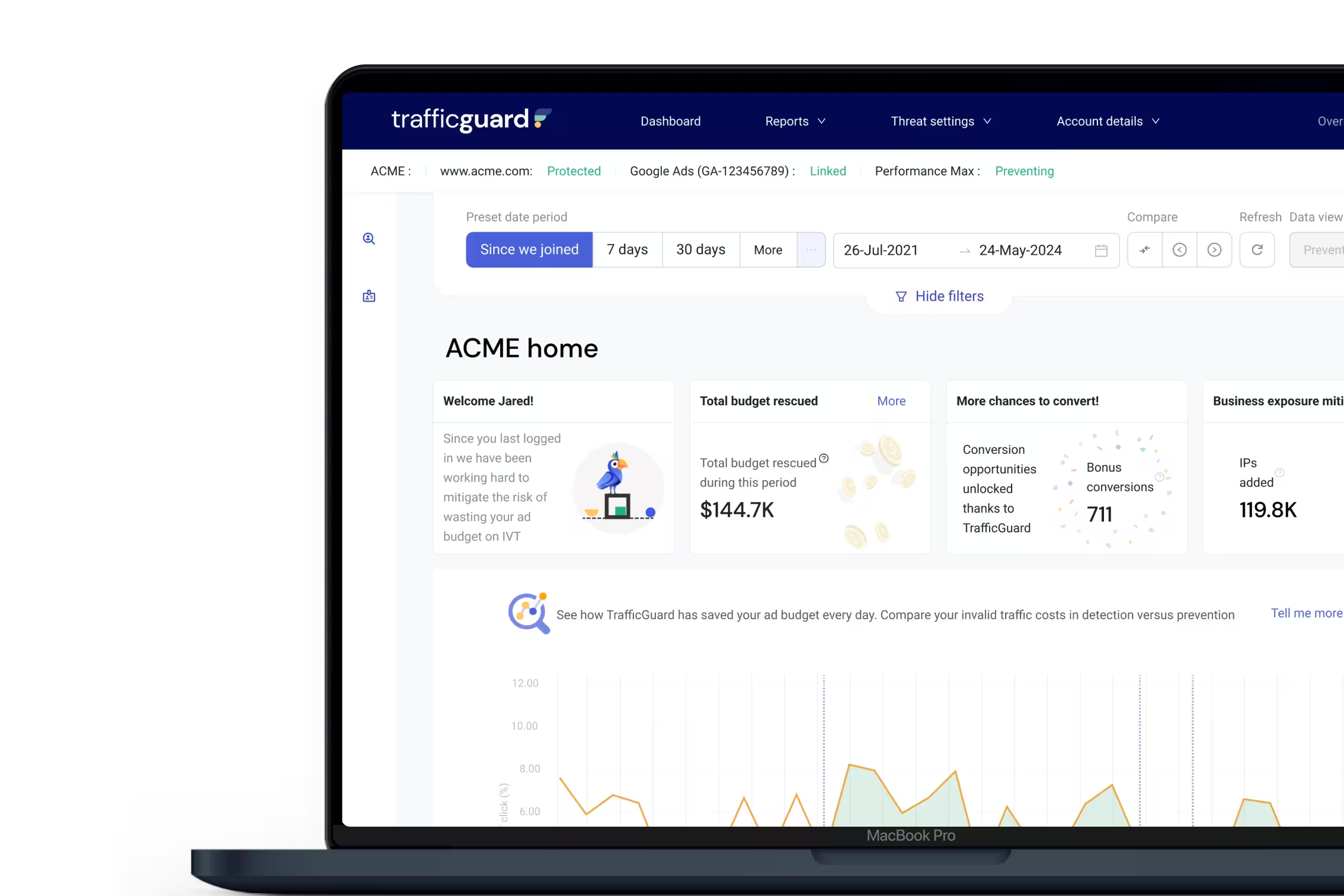
Already Paid for Invalid Clicks or Click Fraud?
We Get It Back.
TrafficGuard Refunds checks what you were billed against the activity actually delivered. We build an evidence-backed claim for the click fraud and invalid traffic you were charged for, submit it to the ad platform for you, and the credit lands straight in your ad account.
The safety net behind our real-time protection for the clicks that get billed before they can be blocked.

Zero setup cost
60-day lookback
Paid only on results
Join 10,000+ advertisers already using TrafficGuard to protect USD 2B+ in ad spend.






























Two layers of protection
Your Second Layer of Defence Against Invalid Clicks
Layer 1 - Before you pay
TrafficGuard Protection
Blocks bots and invalid traffic in real time.
Layer 2 - After you pay
TrafficGuard Refunds
Recovers what was billed first: first clicks from new sources, placements you can't exclude, and spend from before you were protected.
What we verify
What We Verify Across Your Ad Spend
We check the activity and billing details that determine what each platform should actually charge you.
How it works
How Invalid Click Refunds
Work in 3 Steps
We bring together your campaign activity, pricing, and platform billing data to verify what you should have paid. We build the claim, submit it, and track it through to resolution.
Claim
We build the case
We analyse the previous 60 days of your paid media, identify the invalid traffic you were charged for, assemble the evidence and calculate each claim.
Pursue
We submit and chase
Each claim goes to the ad platform with its own Claim ID. We track every dispute through the platform's resolution process, so your team never has to.
Recover
You get paid back
Refunds are credited directly to your ad account. Then it keeps running, auditing, and claiming continuously for as long as we work together.
Campaign & Pricing
Actual Ad Activity
Platform Billing

TrafficGuard Refunds
Independent Ad Spend Verification
Verified Result
Every paid channel
Refunds Across Your Whole Media Mix





Why Outsource It
Doing It In-House vs
Using TrafficGuard Refunds
Fully Transparent
Every Refund Claim is Backed by Evidence
Evidence-backed claims
Each claim is built around the verified invalid traffic and the data that proves it.Platform resolution handled
We manage the dispute end to end, through to a credit or refund.Paid into your account
Refunds go straight from the platform to your ad account. Never through us.A Claim ID for everything
Trace any refund back to the claim, the evidence, and the platform decision.
Commercial model
If We Don't Recover,
You Don't Pay

Zero setup cost.
Nothing to pay to get started. Your first audit covers the last 60 days.

Zero operational risk.
No change to your campaigns, bidding, or tracking. No extra work for your team.

Fully performance-based.
We take an agreed share of successfully recovered refunds. Nothing on claims that don't land.
Built For
We Built for Brands and Agencies

Brands
Recover wasted ad spend with no extra cost, no new tools, and no fee unless refunds land.
Agencies
Recover spend across every client account and channel, with an auditable Claim ID behind every dollar you report back.
FAQs of Invalid Click Refund
Can’t find what you are looking for? Go to our support page to learn more.
Yes. Google credits some invalid clicks automatically, but many are billed as normal and never refunded unless someone proves them. TrafficGuard Refunds builds an evidence-backed claim for the invalid clicks you were charged for, submits it to Google, and tracks it until the credit lands in your ad account.
You need to identify the invalid clicks, gather the evidence behind them, calculate what you were overcharged, and submit a claim, then follow it through Google's review. TrafficGuard Refunds does all of this for you, with a Claim ID for every claim so you can track it.
Yes. Meta reviews invalid activity too, and TrafficGuard Refunds submits evidence-backed claims to Meta the same way it does for Google. The same applies to TikTok, Apple Ads, Snapchat, Microsoft (Bing) Ads, X Ads, and YouTube.
Invalid clicks are clicks that don't come from a genuine, interested person: bots and automated tools, click farms, competitors clicking your ads, or repeated accidental clicks. Some are filtered automatically. The rest are billed to you like any other click.
Google Ads shows invalid clicks and invalid click rate in your campaign reports, but only for the clicks Google has already filtered. Clicks it missed look like normal paid clicks. Finding those needs independent traffic data, which is what our audit checks.
Protection stops invalid traffic going forward, but some is billed before it can be blocked: the first click from a new source, placements platforms don't let you exclude, and spend from before you were protected. Refunds recover that money, so prevention and recovery work together.
Yes. TrafficGuard Refunds is available to TrafficGuard customers, and works alongside our real-time protection.
Advertisers typically recover 1–2% of their paid media spend. That is incremental, high-margin cash, with no extra media spend and no operational overhead. Book a demo, and we'll size it against your actual spend.
Google Ads, YouTube, Meta, TikTok, Apple Ads, Snapchat, Microsoft (Bing) Ads, and X Ads.
We start with the previous 60 days of your paid media activity, then keep auditing and claiming continuously.
Each platform runs its own review, so timing varies. You can track every claim's status by its Claim ID until the credit lands.
Straight to you. Platforms credit refunds directly to your ad account against the Claim IDs we submit. The money never passes through us.
Zero setup cost and fully performance-based. We take a revenue share on refunds that are successfully recovered, so we only earn when you do.
Find Out What You're Owed