

Google Ads IP Exclusions: Why Account-Level Protection Matters

Bots can rotate IP addresses, change locations and move between campaigns, making one source of invalid traffic look like multiple genuine visitors. Account-level IP exclusions help advertisers apply protection across Google Ads, including Performance Max, while automated protection keeps pace with changing threats.
Imagine you own a hotel in Rome.
Someone searches Google for "hotels in Rome", sees your ad and clicks. Nothing unusual there.
Except the next click comes from Florida. Then Chicago. Then Kentucky, Georgia, Pennsylvania and North Dakota.
Seven clicks, seven different locations, all within milliseconds.
Either your hotel has become the most popular destination in America overnight, or something isn't right.
It's one bot dressed up as seven different visitors: seven IP addresses, seven clicks on your ads, and up to seven charges against your budget.
One bot, seven clicks, seven disguises.
And if your fraud prevention treats every click, IP address and campaign as an isolated event, you miss the pattern connecting them.
That's why effective Google Ads click fraud prevention requires more than identifying and excluding individual IP addresses. It requires understanding how suspicious traffic behaves across campaigns and keeping exclusions updated as threats change.
Account-Level vs Campaign-Level IP Exclusions: What's the Difference?
Seven different addresses raise an obvious question: where do you exclude them? Google Ads gives you two places, and they do different jobs.
Campaign-level IP exclusions apply to one campaign at a time, with up to 500 addresses per campaign. They're the right tool for exclusions that only make sense in one place. But an address excluded from one campaign can still click your ads in another, and Performance Max and YouTube campaigns have no campaign-level IP exclusion setting at all.
Account-level IP exclusions apply to every campaign in the account, including Performance Max and YouTube. That makes the account-level list the right place for invalid traffic that follows you across the account, such as bots and proxy networks. They don't care which campaign an ad belongs to.
The two lists can also work together. Google Ads combines applicable account-level and campaign-level exclusions, allowing advertisers to maintain campaign-specific controls alongside account-wide protection.
The key difference is coverage. Campaign-level exclusions protect individual campaigns, while account-level exclusions extend protection across the account, including campaign types that don't offer their own IP exclusion settings.
For detailed configuration instructions, see our guide to excluding IP addresses in Google Ads.
One Bot, Multiple Identities
A basic bot might repeatedly click an ad from the same IP address. Once that address is identified and excluded, further ad interactions from that source can be restricted.
More sophisticated automation is harder to catch.
Bots can route activity through different IP addresses, use proxies to disguise their origins and change the characteristics of their browsing sessions.
To an advertiser looking at individual clicks, the activity looks unrelated. One click comes from a laptop in one location. Another originates somewhere entirely different.
But when you look at the activity together suspicious patterns may emerge.
- Sudden bursts of clicks from multiple locations
- Repeated interactions at unnatural speeds
- Similar behaviour across different IP addresses
- Sessions showing little evidence of genuine interest
An individual signal might not prove that a click is fraudulent. Combined, however, these behaviours can tell a very different story.
An IP address can tell you where a click appears to come from. It doesn't necessarily tell you who, or what, is behind it.
That's why identifying suspicious IP activity requires looking beyond individual addresses.
Your Campaigns Are Separate, but the Bots Aren't
Consider an advertiser running several Google Ads campaigns.
One promotes hotels in Rome. Another advertises weekend breaks in Paris. A third focuses on last-minute travel deals.
From a marketing perspective, these are different campaigns, with separate objectives, audiences and budgets.
But automated traffic doesn't make that distinction.
It can interact with multiple campaigns, change IP addresses between clicks and generate activity that looks harmless when each campaign is reviewed separately.
Now imagine one suspicious source generates two clicks in your Rome campaign, another two in Paris and three more in your last-minute deals campaign.
Viewed independently, none of those campaigns show an obvious concentration of activity.
Viewed together, it's seven clicks from one source.
That's the limitation of analysing invalid traffic one campaign at a time: suspicious behaviour can extend across the account.
Account-level analysis helps identify patterns that span multiple campaigns. Account-level IP exclusions then provide a way to apply an exclusion across those campaigns without managing each list separately.
This becomes particularly important for Performance Max, which doesn't support campaign-level IP exclusions.
Why Static IP Exclusion Lists Aren't Enough
IP exclusions are an important tool for protecting Google Ads budgets.
Once an IP address is identified as a source of unwanted traffic, excluding it can prevent ads from being served to that address.
But what happens when the source changes its IP?
If the source changes IP addresses, excluding the original address doesn't stop the activity. The list is still essential. What matters is what goes on it, how quickly it changes, and whether you can recognise suspicious behaviour even when the address changes.
Exclusions also carry a cost. Legitimate users share IP addresses, and addresses can be reassigned over time. Excluding too broadly or keeping outdated exclusions indefinitely risks preventing genuine prospects from seeing your ads.
So simply adding more addresses to an exclusion list won't solve it.
Effective protection isn't about blocking the largest number of IP addresses. It's about identifying which addresses and networks should be excluded, then adapting as traffic patterns change.
In practice, four steps make IP exclusions harder for rotating bots to evade:
- Exclude at account level, so every campaign is covered.
- Use IP ranges rather than single addresses.
- Review exclusions regularly and remove stale ones.
- Look at activity across campaigns, not one campaign at a time.
How TrafficGuard Automates Account-Level IP Protection
Google Ads gives advertisers the ability to exclude IP addresses across their account. TrafficGuard takes that a step further by automating which addresses and network ranges should be excluded.
With Smart Ranges, TrafficGuard can block suspicious network ranges rather than relying entirely on individual IP addresses.
The account-level exclusion list is refreshed every hour, prioritising the sources associated with the most damaging bot activity.
This matters because Google's account-level list has a limited number of entries. TrafficGuard uses up to 500 entries, including individual IPs and network ranges, to extend protection across the account.
And because a network range can contain genuine customers alongside suspicious traffic, exclusions need to be selective. TrafficGuard evaluates traffic patterns and adjusts protection to reduce the risk of excluding legitimate users.
The result is an automatically maintained layer of IP protection across Google Ads, including Performance Max, while existing campaign-level exclusions remain in place.
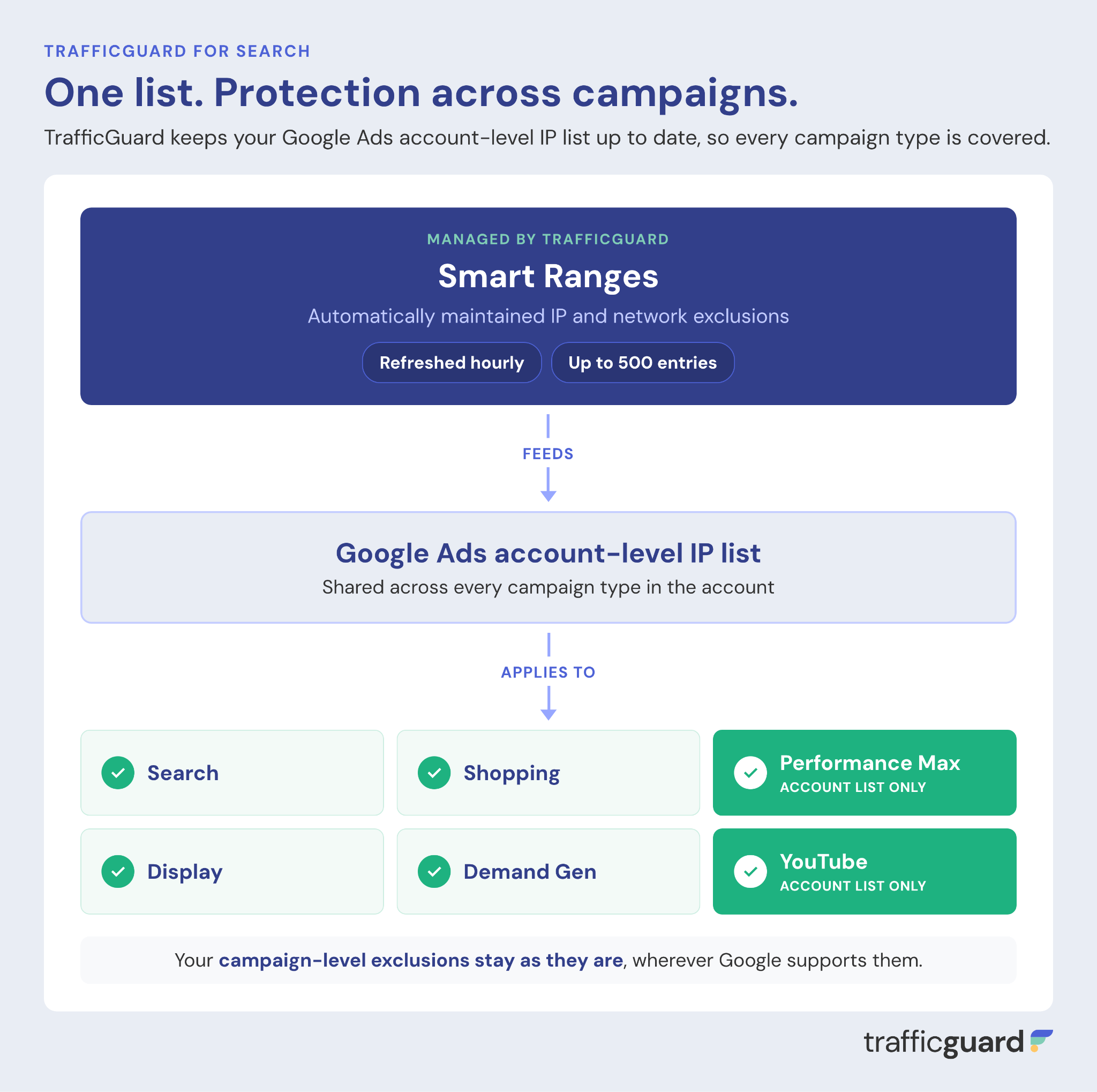
Making the most of Google's IP exclusion limits
TrafficGuard's automated account-level list supports up to 500 entries, including individual IP addresses and network ranges.
Rather than filling that list with static exclusions, TrafficGuard continually evaluates activity and updates the entries to prioritise relevant threats.
Smart Ranges help extend the coverage of those entries, while automated refreshes allow the list to adapt as suspicious sources change.
Protecting genuine customers matters too
Network-level exclusions need to be selective.
A network associated with suspicious activity might also contain legitimate users. Blocking too broadly could prevent genuine customers from seeing your ads.
TrafficGuard evaluates traffic patterns and considers legitimate-user activity when selecting exclusions, helping reduce the risk of blocking potential customers.
The result is an automatically maintained layer of IP protection across Google Ads, including Performance Max, while existing campaign-level exclusions remain in place.
Your campaigns keep running. TrafficGuard keeps the exclusion list updated.
Additional protection against data-centre and proxy traffic
TrafficGuard's account-level IP exclusions help advertisers prevent repeat invalid clicks across their Google Ads campaigns, including suspicious activity originating from data centres, VPNs and proxy networks.
Rather than relying on individual campaign exclusions, TrafficGuard identifies suspicious traffic patterns and applies exclusions at the account level, helping prevent invalid sources from repeatedly consuming ad spend.
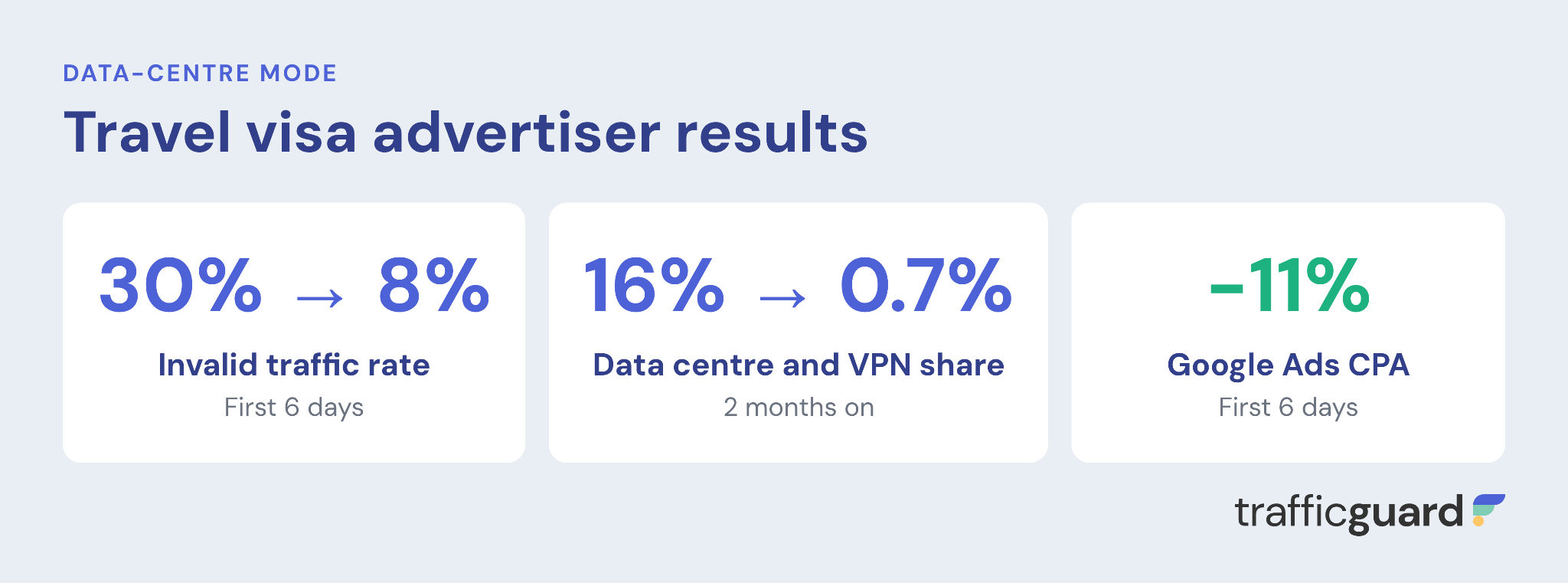
These results demonstrate how account-level exclusions can reduce exposure to invalid traffic, protect advertising budgets and help ensure more spend reaches genuine potential customers.
What Effective Google Ads IP Protection Looks Like
A dashboard showing thousands of excluded IP addresses looks impressive. But the number alone doesn't tell you whether your campaigns are better protected.
What matters is whether your protection is making a meaningful difference to campaign performance.
That means looking at:
- Invalid traffic: Are fewer suspicious clicks reaching your campaigns?
- Genuine users: Are legitimate prospects still able to interact with your ads?
- Campaign coverage: Does protection extend across Search, Shopping, Performance Max and other campaign types?
- Efficiency: Are you reducing unnecessary spend without restricting valuable traffic?
- Ongoing protection: Are exclusions adapting as traffic sources and behaviour change?
Google Ads already provides IP exclusion controls. The challenge for advertisers is deciding what to exclude, applying those decisions consistently and keeping protection relevant over time.
That's where automated, behaviour-led protection makes the difference.
Because whether a bot shows up once or seven times using different IP addresses, it still isn't a customer.
Frequently Asked Questions About Google Ads IP Exclusions
Can you exclude IP addresses at account level in Google Ads?
Yes. Google Ads supports account-level IP exclusions across campaign types including Search, Shopping, Display, Demand Gen, Performance Max and YouTube.
You can manage these exclusions through Admin, Account settings and IP exclusions. Account-level exclusions provide centralised control without requiring the same addresses to be entered into individual campaigns.
Can you block IP addresses in Performance Max campaigns?
Yes, through account-level IP exclusions.
Performance Max doesn't offer campaign-level IP exclusion settings, but it supports exclusions applied at the account level. This allows advertisers to restrict ad delivery to identified unwanted IP addresses across Performance Max campaigns.
How many IP addresses can you exclude in Google Ads?
Google Ads allows up to 500 IP exclusions per campaign.
TrafficGuard's automated account-level list supports up to 500 entries, which can include individual IP addresses and network ranges.
Using carefully selected ranges can help extend coverage beyond individual addresses without requiring a separate entry for every IP.
What are Smart Ranges?
Smart Ranges are constantly updated groups of related IP addresses that TrafficGuard excludes as one entry, so bots can't get round the block by switching addresses.
What is automated protection?
Automated protection means TrafficGuard manages your Google Ads IP exclusions for you. In Prevention mode, it adds sources of invalid traffic to your exclusion list via the Google Ads API, then continuously adds, removes and reprioritises IPs and Smart Ranges based on the most current threats. The account-level list is refreshed every hour, so you don't have to investigate clicks or update lists by hand.
Do account-level IP exclusions replace campaign-level exclusions?
No. Account-level and campaign-level exclusions can work together.
Google Ads combines the applicable exclusion lists for supported campaigns, allowing advertisers to maintain campaign-specific exclusions alongside broader account-wide protection.
With TrafficGuard's automated account-level protection, existing campaign-level lists remain unchanged.
Can IP exclusions stop click fraud completely?
No. IP exclusions are one component of click fraud prevention, but they cannot guarantee that all invalid traffic will be stopped.
Bots can rotate IP addresses, use proxy networks and change their behaviour to avoid detection.
Effective protection requires ongoing traffic analysis, accurate threat identification and regularly updated exclusions to respond to evolving sources of invalid traffic.
Stop Invalid Traffic Across Your Google Ads Campaigns
Bots change IP addresses, locations and campaigns. Your protection needs to keep up.
TrafficGuard helps advertisers detect and prevent invalid and non-incremental traffic across Google Ads, with automated account-level IP protection that extends to Performance Max.
Protect your Google Ads budget without manually managing every IP exclusion.
Get started - it's free
You can set up a TrafficGuard account in minutes, so we’ll be protecting your campaigns before you can say ‘sky-high ROI’.

Explore More Blogs



Subscribe
Subscribe now to get all the latest news and insights on digital advertising, machine learning and ad fraud.


